




How to achieve best practices in IT Alerting? In order to use IT alerting effectively, the following points should be taken into account:
Success factors in IT Alerting
Clear prioritization
Not every alert is equally important. Filtering is crucial and prioritization helps to use resources efficiently.
Targeted notification
Instead of sending alerts as group notifications, they should be targeted to individuals with the appropriate capability and according to responsibility and availability. This ensures a fast and effective response.
Consideration of availability
For out-of-hours alerting, which is often the most critical, consideration of on-call schedules is essential. Ideally, a solution comes with integrated planning and switching between on-call staff is automatic. This also allows a BYOD strategy and avoids the handover of on-call phones or the tedious reprogramming of telephone systems on a weekly basis.
Avoidance of alert fatigue
Too many notifications can lead to excessive demands. Filters and escalation levels are crucial here. Alert fatigue is a well-known problem.
Integration with other tools
IT Alerting should be seamlessly integrated with existing ITSM or collaboration tools.
Tracking
IT Alerting should allow the status of an alert to be viewed in real time, i.e. in particular whether someone is dealing with the problem (‘ownership’). This eliminates the need to manually track whether work is being done to resolve a problem.
Regular check
The configuration of the alarms should be checked regularly and adapted to current requirements.

Gaps in IT Monitoring: Missing Multi-Channel Communication and Custom Alert Actions
However, most IT monitoring tools are sometimes subject to severe restrictions in terms of IT alerting. The availability of corresponding communication channels is limited, e.g. many tools only offer email or at most SMS text. Few tools have a mobile app with push alerting and this is often only implemented in a rudimentary way. You cannot receive incoming alerts in the same manner like a WhatsApp message from a friend.
Almost all IT monitoring solutions do not offer the option of acknowledging alerts (or even sharing that action in real-time with other team members) or escalating them if there is no response. However, these are functions that are extremely relevant for critical alerts and outside of business hours. IT monitoring tools are therefore usually unable to meet the requirements of best practice.
Planning and management of on-call duty is also only supported by a handful of IT monitoring solutions.
For very simple and non-critical scenarios, it may therefore be possible to fall back on the integrated alerting capability of IT monitoring software. For business-critical requirements, however, this will not be sufficient in most cases. So what is the solution?
Best Practices in IT Alerting: SIGNL4 – The Dedicated Incident Response Software
Fortunately, there are software and SaaS tools that specialize in IT alerting. SIGNL4 is one such powerful IT alerting software that is specifically designed to deliver and manage critical alerts effectively and efficiently. With SIGNL4, companies can ensure that important alert notifications always reach the right people at the right time. The outstanding features of SIGNL4 include:
Rapid and reliable alert notifications
SIGNL4 supports various communication channels such as push notifications, SMS text and voice calls to ensure that alarms are noticed immediately. Users or administrators can define notification profiles depending on the type of alert.
Alert management on the go
SIGNL4 offers a powerful mobile app that becomes the center of IT alerting. Alerting via push is very reliable thanks to the override of silent mode and the app offers many options for configuring alerts individually. It supports acknowledgements, escalations, on-call management, remote actions and many other useful functions. SIGNL4 – Your Mobile-Ready Alert Management System Making a Big Impact.
Shift and escalation management
The integrated shift schedule and escalation levels ensure that alarms do not go unanswered. This prevents alarm fatigue, as alarms are only delivered to people on duty or on call.
Alert Customization
From categories to custom sounds and preferred channels, SIGNL4 gives you complete control over how alerts reach your team.
Seamless Integration with Your Existing Systems
SIGNL4 can be seamlessly integrated into existing IT and monitoring systems. Over 185 integrations have been tested, verified and documented.
Mobile app support
SIGNL4’s mobile app provides real-time monitoring and management of alarms, further reducing response time.
Alert Lifecycle Tracking
Alert lifecycle tracking shows you if and when alerts are acknowledged, who owns them, the time to resolution, and provides data for continuous improvement.
Alert Enrichment
In SIGNL4 it is possible to enrich alerts with additional data and information. SIGNL4 currently supports enriching alerts with:
- Geo-location on a map
- Subject line
- Additional text, e.g. for instructions
- Weblinks
Enrichment is based on categorization of events/alerts through a keyword matching algorithm.
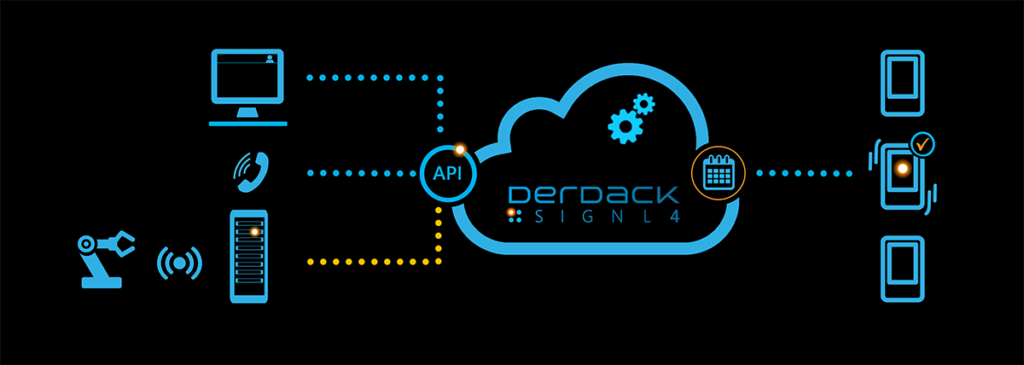
SIGNL4 therefore is an excellent choice for companies looking for a reliable and flexible IT alerting system to minimize downtime and increase the efficiency of their IT team and achieve best practice in IT Alerting. Here you can find more information about SIGNL4
IT Alerting and the future
With the increasing complexity of modern IT environments, IT alerting is also becoming more and more important. Artificial intelligence (AI) and machine learning are playing a growing role in the prediction and prioritization of alerts. Future systems will therefore work even more precisely and efficiently to help companies face growing IT challenges and ensure the availability of critical IT systems.
Summary
IT alerting is an indispensable part of modern IT infrastructures. It ensures that problems are detected and resolved quickly, which improves the stability and efficiency of business operations. By using best practices and modern technologies such as AI, companies can further optimize their IT operations and make them future-proof.
If you want to improve your alerting system, you should invest in a combination of powerful IT monitoring and specialized IT alerting software and ensure that your teams are optimally trained. This will keep you one step ahead.
