




TL;DR: An escalation policy is a timeout-driven routing chain that moves unacknowledged alerts from primary to backup to manager, with each tier configured for your service level. Three to five severity tiers cover most IT environments. Tie escalation logic to your shift schedule rather than static contact lists to eliminate coverage gaps.
Every IT team has a version of the same problem: an alert fires, and the right person never sees it. The cause is rarely the monitoring tool. It is usually a routing rule that was accurate when someone wrote it and has quietly drifted out of date since. People change shifts, swap rotations, and leave the company, but the escalation chain keeps pointing at the old contacts.
An escalation policy that routes to a static list fails the moment that list goes stale. For 24/7 IT operations teams, a reliable policy defines who gets alerted, in what order, and what happens when nobody responds within a defined window. It works only if routing follows who is actually on shift right now, and every step leaves a timestamped record.
This article defines escalation policies for 24/7 IT teams, explains the building blocks that prevent silent failures, and provides four ready-to-use templates.
Why your team needs an escalation policy
Without a documented escalation policy, your team relies on memory and manual triage to route alerts. Escalation matrix templates define clear escalation levels based on incident severity, required response time, and technical complexity, ensuring critical issues reach the right people while maintaining service level agreements. For 24/7 teams, the policy removes guesswork about who should act when the primary responder is unavailable, asleep, or handling another incident.
A written policy also creates accountability. When you can trace an alert from trigger to acknowledgment to resolution, you stop relying on post-incident guesswork during compliance reviews and management reporting.
When to route and when to escalate
Alert routing directs an event to the correct team based on the affected system. Alert escalation moves that event up a chain of responders when the initial target does not acknowledge within a timeout window. You route to find the right skill set. You escalate to find an available human. An effective policy does both: routes based on the current shift schedule, then escalates if acknowledgment does not occur.
Key building blocks for alert routing
Three elements determine whether your escalation policy prevents silent failures. Severity tiers match alert urgency to response speed, timeout windows trigger automatic escalation, and acknowledgment tracking confirms receipt. Configure these correctly, and you eliminate the scenario where a critical alert disappears into a silenced phone.
We built our platform to handle these building blocks without custom scripting, but you can apply the concepts in any modern alerting tool.
Defining alert severity tiers
Three to five well-defined tiers, each with clear thresholds and a defined response chain, cover most organizations according to incident severity best practices. A typical mapping sends the highest tier (S1, Critical) to immediate mobile escalation and the lowest tier to an email-only category, with channels and acknowledgment windows for the tiers in between assigned based on business impact. Clear definitions prevent alert fatigue by ensuring only true emergencies bypass Do Not Disturb settings.
How timeout windows prevent failures
A timeout window is the maximum time a responder has to acknowledge an alert before the system notifies the next tier. Without timeouts, alerts wait indefinitely on unreachable responders. Set the window too short and you create unnecessary escalations. Set it too long and you extend downtime. For critical infrastructure alerts, the acknowledgment window is commonly set to 5 minutes. High-severity alerts often allow 10 to 15 minutes, medium-severity alerts might allow 15 to 30 minutes, and low-priority alerts can use 30 minutes or longer.
Building reliable escalation workflows
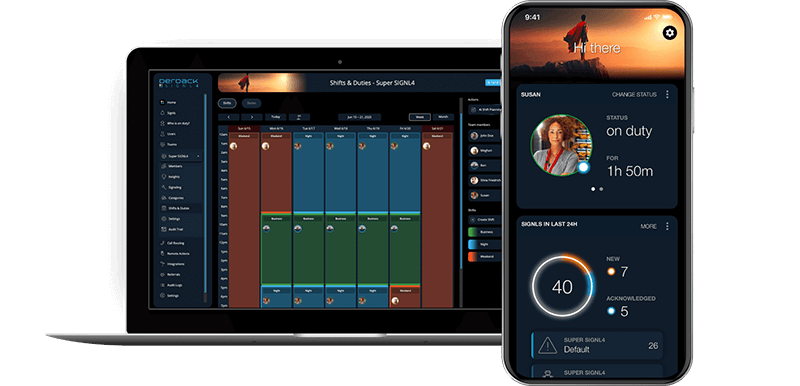
An escalation workflow defines the sequence: primary on-call receives the alert, waits for acknowledgment, then backup engineer receives it after timeout, then escalation manager after second timeout. We support up to six escalation tiers, allowing you to add management tiers or functional specialists. You configure the tiers inside the Shifts & Duties section of our web portal, defining response timelines for each tier. The workflow must trigger automatically based on time, not manual intervention.
Mapping alert paths for reliable response
Once you define severity tiers and timeouts, map the actual paths alerts take through your organization. This includes deciding whether to escalate hierarchically (up the org chart) or functionally (to a specialist), and determining when to use automated versus manual triggers.
Automating role-based alert routing
Role-based routing sends alerts to specific skill sets rather than specific individuals. A database alert goes to the DBA on duty, while a network alert goes to the network engineer on call. This requires your alerting platform to know both the alert category and who currently fills each role. We handle this through duty scheduling tied to alert categories, so routing reflects who is actually on shift for that specialty. AI-powered event routing goes further: it classifies incoming events by content and routes them to the correct on-call team automatically, which keeps category routing accurate in high-volume environments.
Hybrid alert routing best practices
Most teams need hybrid routing: some alerts escalate hierarchically to ensure management visibility, while others route functionally to resolve technical issues faster. For S1 incidents, automatic escalation to senior support and escalation management should happen at the point of classification, not after a resolution attempt fails. Time-based triggers add further accountability for high-severity incidents that remain unresolved, though specific timeframes vary by organizational structure and service level agreements.
Mapping response windows to incident priority
Timeout windows should reflect business impact. A payment gateway outage at 2 a.m. requires faster response than a test server alert. Define your windows in writing, test them during shift exercises, and adjust based on false escalation frequency.
Configuring automated timeout thresholds
Match your thresholds to the severity tiers using the windows described above. We let you configure target response times per team or category, with the system automatically escalating when the timer expires without acknowledgment.
Reducing MTTA for high priority alerts
Mean time to acknowledge (MTTA) drops when alerts reach responders through channels they actually check. Email and Slack do not bypass Do Not Disturb settings. Persistent push notifications with iOS mute override ensure critical alerts reach a live responder even when their phone is silenced, earning the mobile app a 4.5/5 rating on iOS and 4.4/5 on Android.
| Metric | Manual Email Escalation | Automated Mobile Push Escalation |
|---|---|---|
| MTTA | Varies, no confirmation of receipt | Confirmed within configured timeout window |
| Acknowledgment confirmation | None, unless responder replies | Explicit per-alert acknowledgment with timestamp |
| Escalation trigger | Manual follow-up required | Automatic after timeout expires |
| Audit trail | No automatic log | Timestamped log generated automatically |
Berlin-Brandenburg Airport filters over 18,000 different messages and alarms per day through our platform, with an operational goal to begin resolving technical and baggage-related fault alarms within three minutes.
Setting timeouts for minor incident alerts
Route low-priority alerts to their own alert category configured to send email only, with no escalation, using the longer windows described above, so they do not wake responders at 3 a.m. or erode the credibility of your escalation chain. SIGNL4 does not forward these alerts to ticket systems, so email is the end of the path.
Proven escalation policy templates for IT teams
These templates provide starting points for common IT operations scenarios. Adapt the timeout windows and tiers to match your service level agreements.
Template 1: Simple alert escalation path
Use this for small teams with a single service. A typical starting point gives the primary five minutes to acknowledge critical alerts before the backup receives the alert, and the escalation manager receives it after ten minutes total.
| Severity | Primary | Suggested timeout | Escalate To |
|---|---|---|---|
| Critical | On-call engineer | 5 minutes | Backup engineer |
| Critical | Backup engineer | 5 minutes | Escalation manager |
| High | On-call engineer | 10 minutes | Backup engineer |
| Medium | Email notification | 30 minutes | On-call engineer |
Template 2: Configuring tiered alerting
This adds a management tier for critical incidents, ensuring leadership visibility for outages that affect revenue or compliance.
| Severity | Primary | Suggested timeout | Escalate To |
|---|---|---|---|
| S1 | Primary on-call | 5 minutes | Secondary on-call |
| S1 | Secondary on-call | 10 minutes | Duty manager |
| S1 | Duty manager | 15 minutes | Service owner |
| S2 | Primary on-call | 10 minutes | Secondary on-call |
| S3 | Queue | 60 minutes | Next business day |
Template 3: Global 24/7 shift coverage
Follow-the-sun coverage routes alerts to the region currently in business hours, reducing off-hours interruptions while maintaining 24/7 coverage.
| Severity | Example region | Primary | Timeout | Escalate To |
|---|---|---|---|---|
| Critical | Americas | US East on-call | 5 minutes | US West on-call |
| Critical | Americas | US West on-call | 5 minutes | EU on-call |
| Critical | EMEA | EU on-call | 5 minutes | APAC on-call |
| Critical | APAC | APAC on-call | 5 minutes | On-call manager (final tier) |
The final tier is the on-call manager, not another regional rotation: looping back to the first region would hand the alert to the responders who just went to sleep, which is the failure follow-the-sun exists to prevent.
Template 4: MSP client-specific routing
MSPs need client-specific escalation paths to meet different SLA requirements while sharing resources efficiently across accounts.
| Client | Severity | Primary | Timeout | Technical escalation | Management notification |
|---|---|---|---|---|---|
| Client A | Critical | Dedicated tech | 5 minutes | Shared backup pool | Client A account manager, notified in parallel |
| Client A | High | Dedicated tech | 10 minutes | Shared backup pool | Account manager on resolution |
| Client B | Critical | Shared pool | 5 minutes | Shared backup pool | Client B account manager, notified in parallel |
| Client B | Medium | Shared pool | 30 minutes | Email category, no escalation | Account manager in the business-hours report |
Keep technical escalation and management notification separate: an unacknowledged critical alert goes to another technical responder, and the account manager is notified in parallel rather than becoming the escalation target. A time frame such as next business day is a notification window, not an escalation target. If an alert needs a response, it needs a named technical responder at the end of the chain.
How to map your alert escalation chain
Mapping your chain requires connecting your monitoring tools to your alerting platform, configuring acknowledgment tracking, and verifying the audit trail before you go live.
Escalation features by plan tier
Escalation capabilities are distributed across our plan tiers to match team complexity. Automated escalation chains require the Optimize plan or higher, as does shift-aware routing.
| Feature | Starter | Notify & Connect | Optimize | Maximize |
|---|---|---|---|---|
| Automated escalations | No | No | Yes | Yes |
| Duty scheduling | No | No | Yes | Yes |
| Flood protection | No | No | Yes | Yes |
| Audit logs | No | Yes (alert-level acknowledgment records) | Yes (alert-level acknowledgment records) | Yes, with custom retention |
| Escalation tiers | N/A (no automated escalation) | N/A (no automated escalation) | Up to 6 | Up to 6 |
The Notify & Connect plan starts at $9 per user monthly on annual billing and adds persistent push, SMS, and voice delivery for teams that cannot afford a missed overnight alert.
Syncing alerts with existing tools
Connect your monitoring stack using native integrations rather than generic webhooks. We provide verified integrations for Zabbix, PRTG, Nagios, Checkmk, and 200+ other tools, which means alert context and severity come through exactly as configured without custom scripting. For legacy systems, use email or REST API connectors, but test parsing rules to ensure critical fields map correctly.
Verifying audit trails for compliance
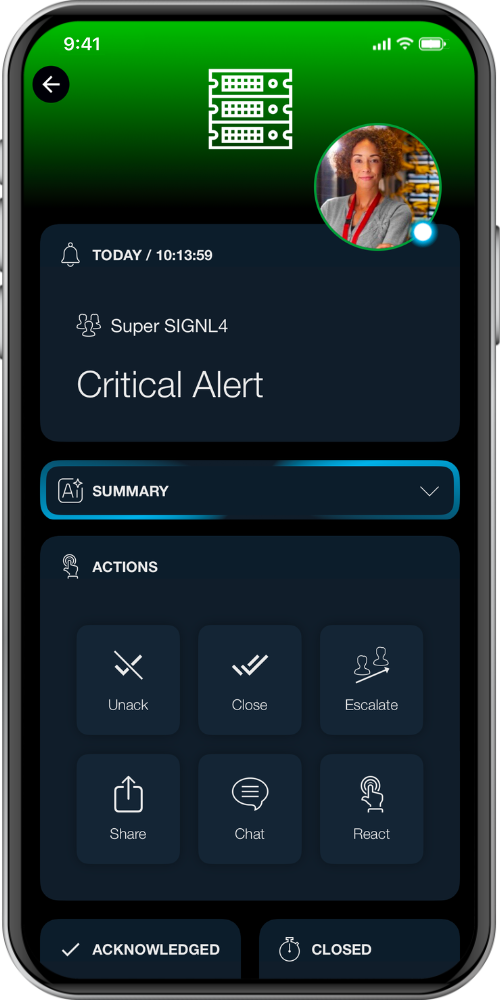
Audit trails must show who was notified, when they acknowledged, from which device, and what actions they took. Email and chat notifications offer no acknowledgment signal, so every alert needs an explicit receipt with an automatic timestamp, and the escalation log should show when each timeout expired and when the backup received the alert. For regulated environments, verify that your platform retains logs for the required compliance period. We offer audit logs with custom data retention on the Maximize plan, and maintain ISO/IEC 27001:2022, TISAX, and GDPR compliance certifications for regulated environments.
How to stop recurring on-call notification misses
Escalation policies fail for predictable reasons: timeouts set too long, missing backup contacts, or alert fatigue causing responders to ignore notifications. Address these specific failure modes to close coverage gaps.
If alerts sit unacknowledged for 20 minutes before escalating, your timeout windows are too long for critical services. Shorten them to the critical and high-severity windows described above, and test them during a shift exercise to confirm escalation fires as expected. If all alerts follow the same path, define separate paths for S1 through S4: S1 escalates on the shortest window, while S4 sends an email during business hours without mobile notification.
If your policy lists only one backup contact, you have a single point of failure. Add at least two tiers beyond the primary, a backup engineer and an escalation manager. Static contact lists also decay as people change roles or leave, so replace them with duty scheduling that reflects current shifts. For global teams, confirm the follow-the-sun rotation connects across time zones rather than looping back to the same sleeping region.
Start a free 30-day trial with full Maximize plan features, no credit card required, to test these escalation templates against your live alert conditions. The trial supports up to 10 users and includes duty scheduling, automated escalations, and audit logs so you can validate the configuration before purchase.
FAQs
What is an alert escalation policy?
An alert escalation policy is a set of rules that automatically routes unacknowledged alerts up a chain of responders, from primary on-call to backup engineer to escalation manager, each with a defined timeout window. If the primary does not acknowledge within the configured time (for example, 5 minutes), the system automatically notifies the next tier without manual intervention.
How long should escalation timeout windows be?
Critical alerts typically use 5-minute acknowledgment windows between tiers. High-severity alerts allow 10 to 15 minutes. Medium-severity alerts may allow 30 minutes. Low-priority alerts often use longer windows or business-hours-only notification to prevent alert fatigue.
What happens if no one in the escalation chain acknowledges?
If the final tier expires without acknowledgment, the platform should trigger a fallback action: a voice call to the duty manager, a message to an emergency distribution list, or continued persistent notifications so the alert keeps firing until a human responds. The alert must not simply stop at the last contact.
How do you prevent escalation fatigue?
Prevent fatigue by routing low-priority alerts to emails rather than persistent push notifications, and by using flood protection to group related alerts. Ensure only true S1 and S2 incidents trigger mobile escalation, and use duty scheduling to prevent routing to off-duty responders.
Key terms glossary
Alert escalation: The automated process of moving an unacknowledged alert to the next responder in a defined chain after a timeout period expires.
Escalation chain: The ordered sequence of responders (primary, backup, manager) who receive an alert if previous tiers do not acknowledge.
Follow-the-sun: A global coverage model that routes alerts to the geographic region currently in business hours, reducing off-hours wake-ups while maintaining 24/7 response capability.
MTTA: Mean time to acknowledge, measured from alert trigger to the first responder confirming receipt.
Mute override: A mobile app capability that bypasses Do Not Disturb settings on iOS and Android to ensure critical alerts generate sound and vibration.
On-call rotation: The schedule defining which team members are responsible for responding to alerts during specific time periods.
Severity tier: A classification level (S1 through S4 or Critical through Low) that determines alert urgency, routing priority, and required response speed.
Shift handoff: The transfer of on-call responsibility from one responder to another at a scheduled rotation boundary, requiring confirmation that active alerts and recent incidents are communicated.
Timeout window: The maximum time a responder has to acknowledge an alert before the system automatically escalates to the next tier.
