

Common Problem
Many teams start with a simple approach to on-call coverage.
One person carries the phone this week. Someone else covers next week. Vacation requests are handled through emails, chat messages, or spreadsheets. When someone is unavailable, everyone is expected to remember who is covering.
This works for a small team until the first missed alert.
Duty scheduling is the foundation of reliable alerting. It determines who is responsible, when they are responsible, and who is expected to take action when an incident occurs.
Without a clear duty schedule, alerts often end up going to the wrong person, unanswered inboxes, or team members who are not currently on call. As organizations grow, managing coverage manually becomes difficult and mistakes become more common.
This guide explains the fundamentals of duty scheduling, the difference between duties and shifts, how stand-ins work, and how to get started with building an effective on-call schedule.
How SIGNL4 Addresses the Problem
SIGNL4 uses duty scheduling to determine who is responsible for responding at any given moment.
Instead of maintaining manual call lists, teams define schedules directly within SIGNL4. Coverage can be assigned based on time, day and/or escalation level.
The system automatically knows:
- Who is currently on duty
- When shifts start and end
- Who is responsible during each shift
- Who is acting as a stand-in when someone is unavailable
- How coverage changes throughout the day, week, or month
As schedules change, SIGNL4 automatically updates who is responsible, helping teams remain responsive without manually updating call lists, contact information, or escalation procedures.
Understanding Duties vs. Shifts
One of the most common areas of confusion is the difference between duties and shifts.
What Is a Shift?
A shift defines a period of coverage.
Examples include:
- Day Shift (8:00 AM – 4:00 PM)
- Evening Shift (4:00 PM – 12:00 AM)
- Weekend Coverage
- After-Hours Support
A shift answers the question:
“When is coverage required?”
What Is a Duty?
A duty represents the assignment of a person to a shift.
For example:
- Day Shift exists every weekday.
- John is assigned to that shift this week.
- Sarah is assigned next week.
The shift defines the coverage window.
The duty defines who is responsible during that coverage window.
A simple way to think about it is:
- Shift = Time
- Duty = Person
Together they determine who is responsible when an incident occurs.
Understanding Stand-Ins
No schedule remains static forever.
People take vacations. Team members attend training. Someone gets sick.
Without a replacement process, these situations create coverage gaps.
Stand-ins allow temporary coverage without changing the underlying schedule structure.
Instead of permanently modifying a shift, a stand-in can temporarily take responsibility for a scheduled duty.
From an operational perspective, this provides several benefits:
- Maintains schedule integrity
- Avoids manual reassignment of future shifts
- Preserves escalation structures
- Ensures someone is available to respond even when schedules change unexpectedly.
For teams that operate around the clock, stand-ins are often just as important as the original schedule itself.
Now that we’ve covered the core concepts, let’s build a basic duty schedule. The process starts with creating shifts, assigning team members, configuring stand-ins, and documenting planned absences. Once these elements are in place, teams have a clear and automated coverage model that ensures responsibility is always assigned when incidents occur.
Getting Started with Duty Scheduling in SIGNL4
Step 1: Create Your First Shift
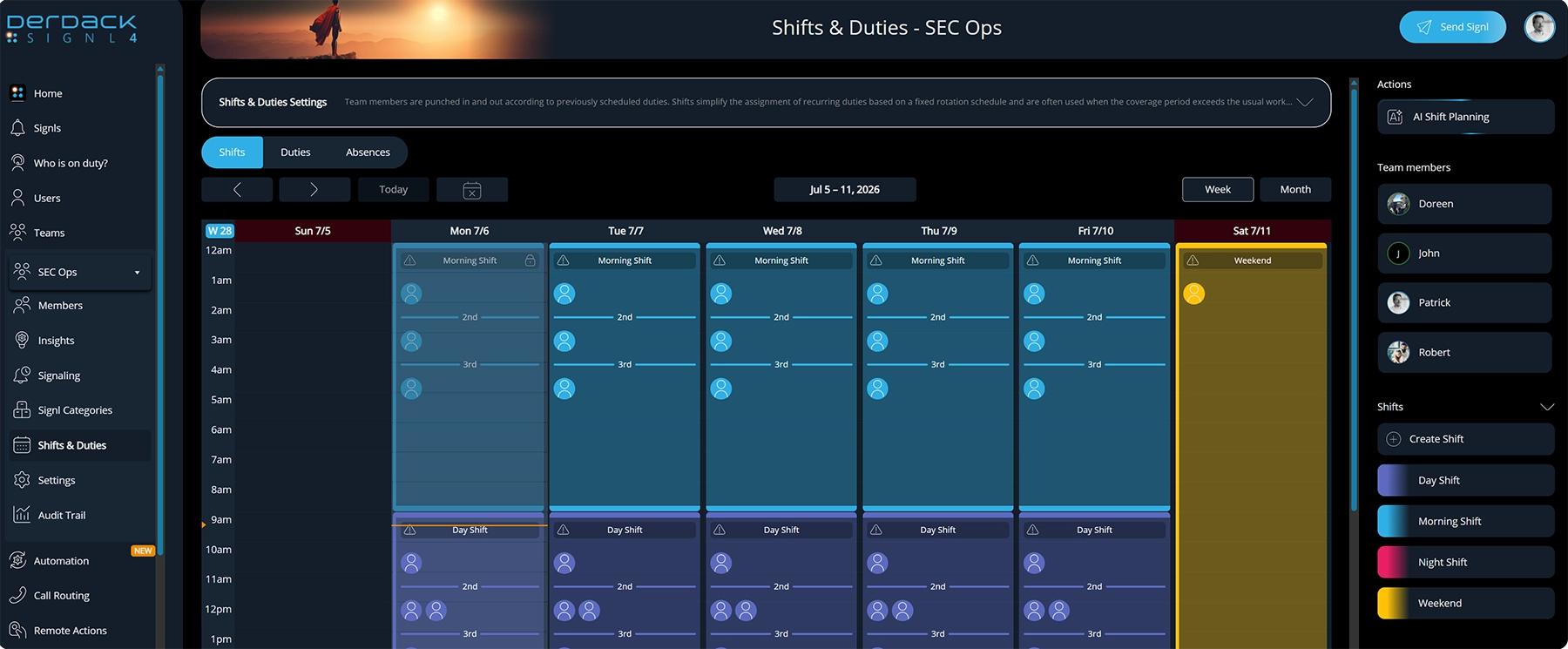
How to:
- From the web portal navigation, select the team and then choose Shifts & Duties. Ensure that Shifts is highlighted at the top of the calendar.
- On the right side, click Create Shift.
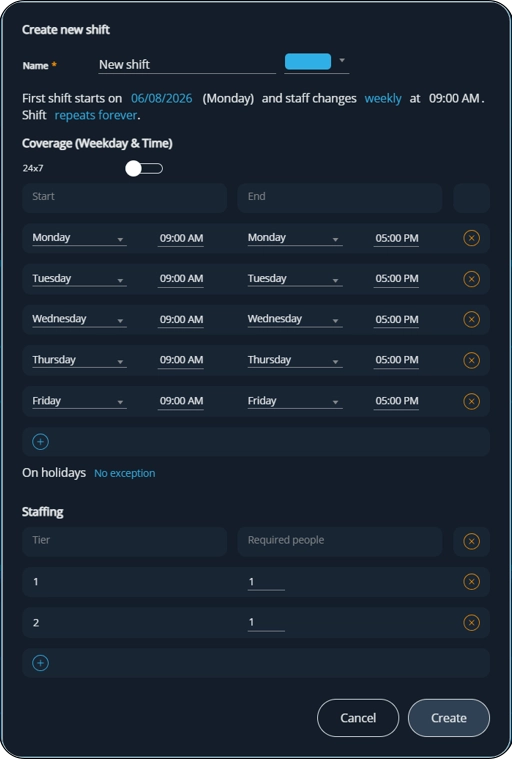
- Configure the following:
- Start date
- Whether the shift changes weekly or daily
- The day(s) of the week
- Starting and end times for those days – users will automatically be punched in and out at these times
- Staffing level – the number of people that needs to be on-duty as well as their priority levels
Step 2: Assign Team Members
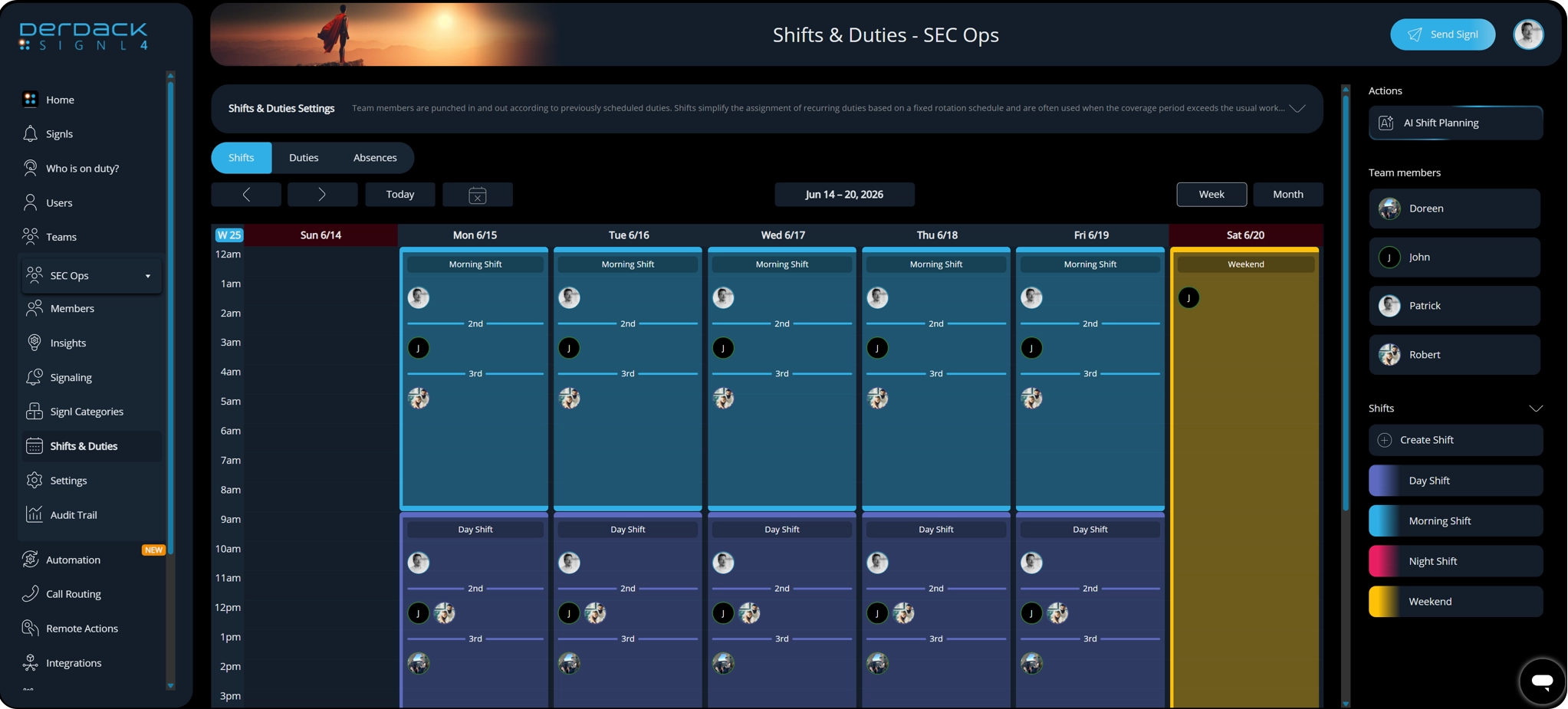
How to:
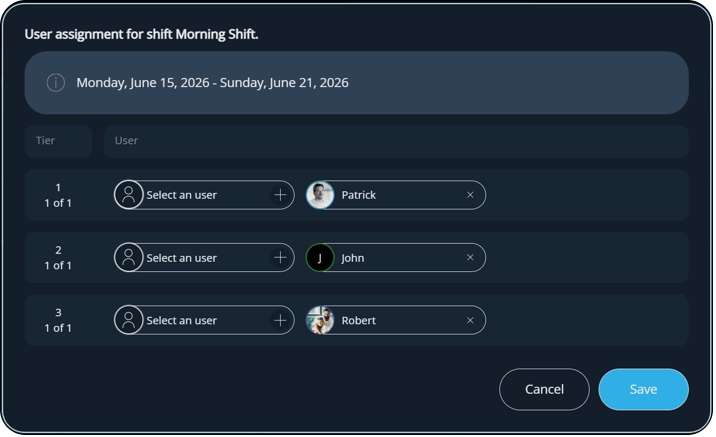
- Now that you have shifts in place, you can simply drag the Team members from the right hand side into the shifts placeholder for a specific tier.
- Alternatively, you can click on the icon placeholder and select the team members from the pop up.
Step 3: Configure Stand-Ins
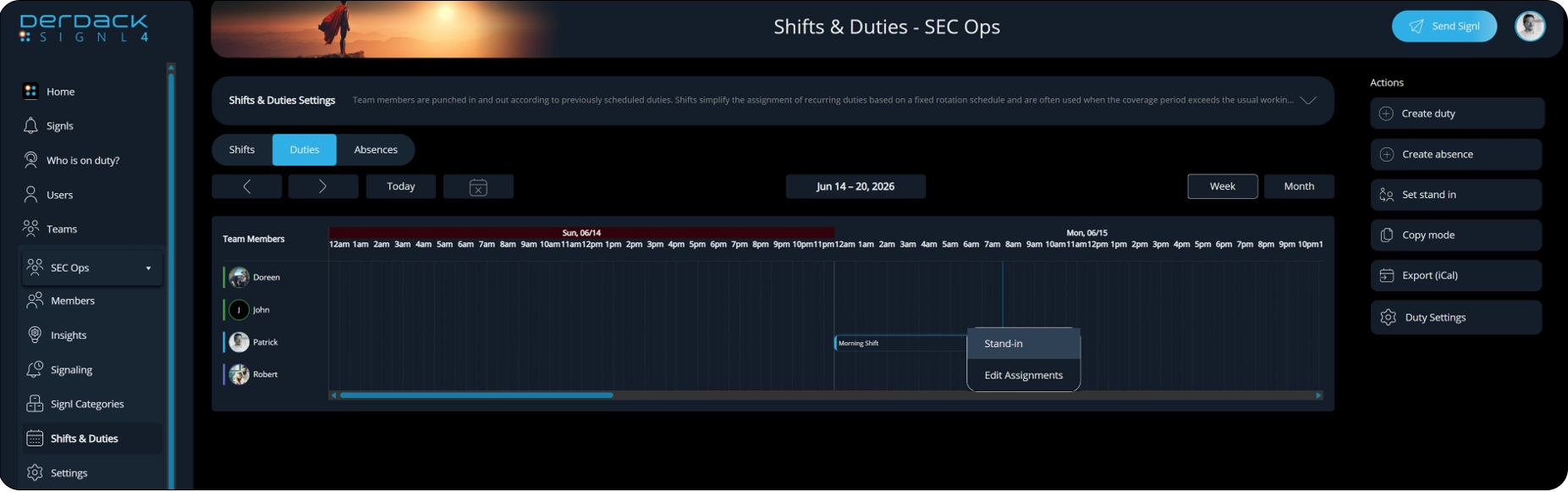
How To:
- From the Duties section of the scheduler you will see all the duties that are assigned to specific individuals. To set a stand in simply click on the desired duty and select Stand-in.
- You will have the option to select who the replacement stand-in should be on the pop up window.
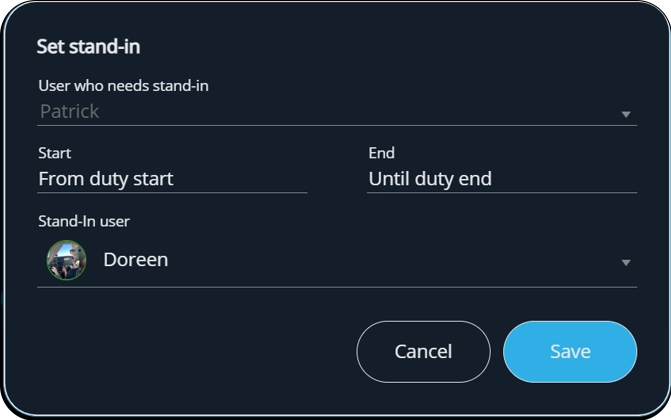
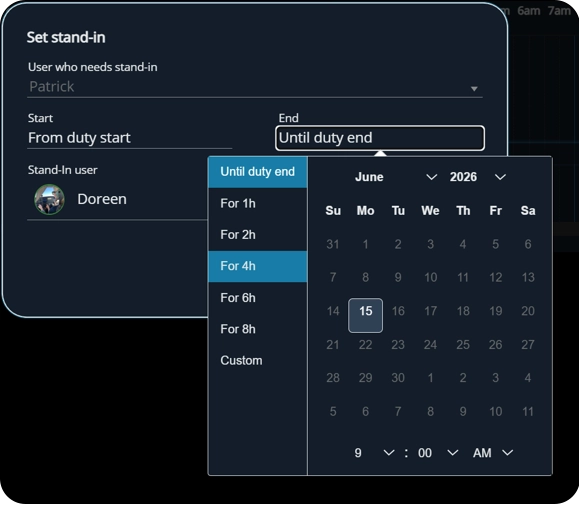
3. The Stand-in can be from for the entire shift or just for a few hours. This is set by clicking the Start and End sections.
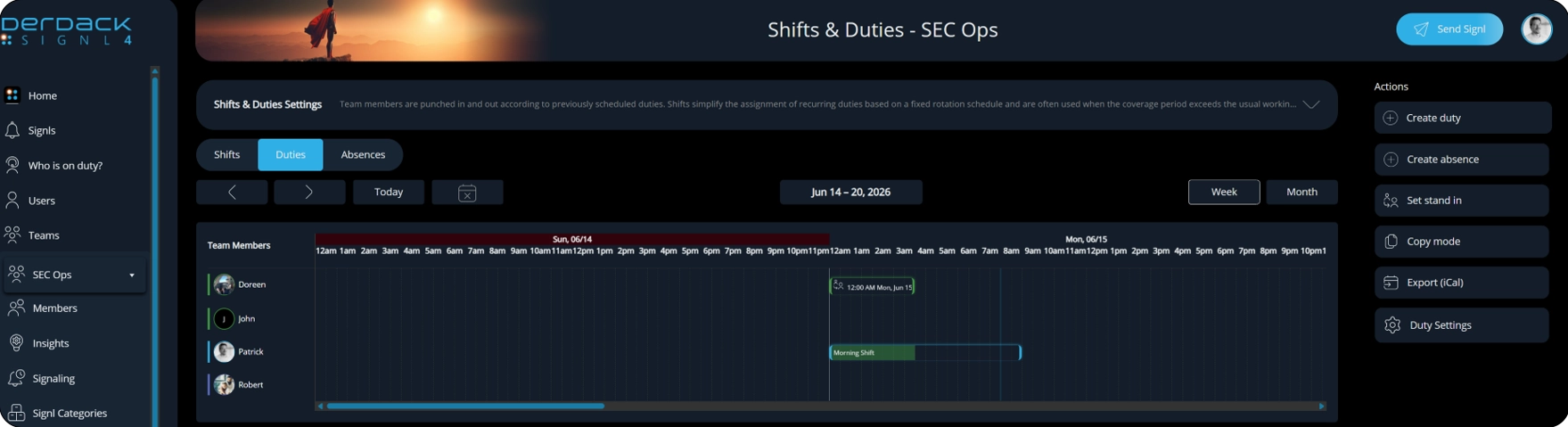
4. Once set you will see another duty show up for the designated user as well as the originally scheduled user.
Step 4: Manage Absences
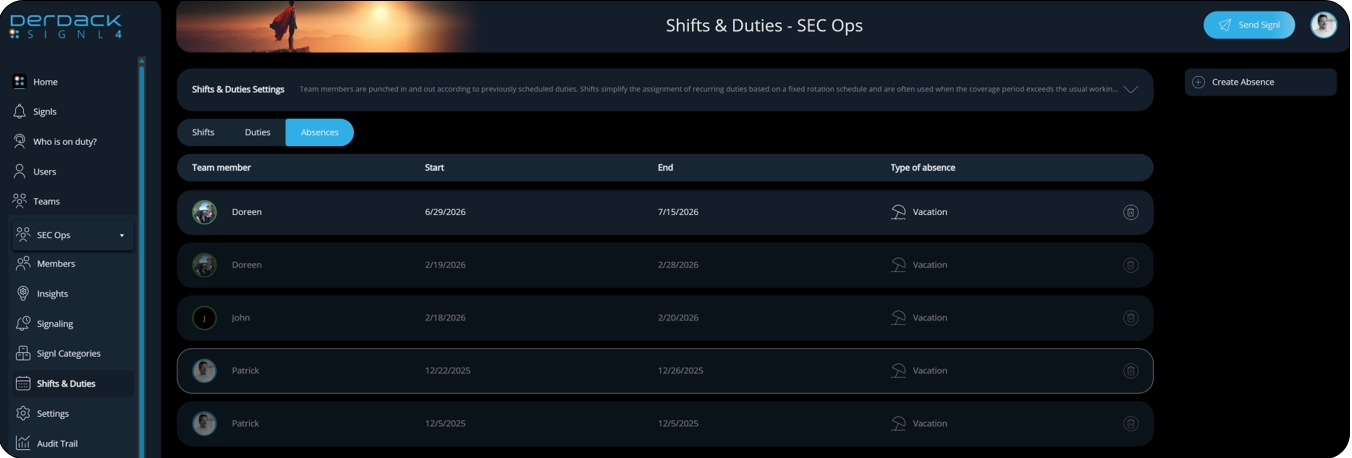
On the same Shifts & Duties section there is an option for Absences as the top. These absences will provide a visual representation on the scheduler that a person is set to be out.
How to:
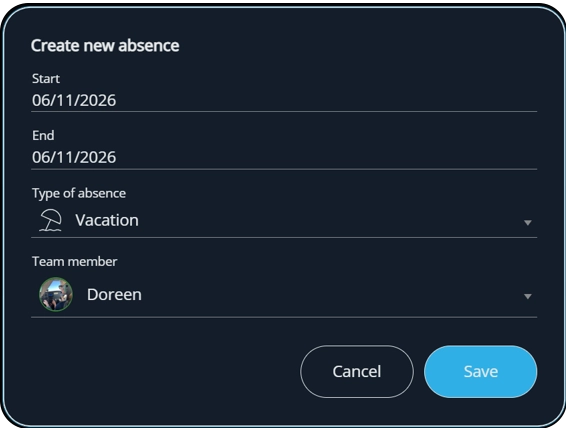
- To create an absence click Create from the right side.
- Select the dates, type of absence and duty member on this screen.
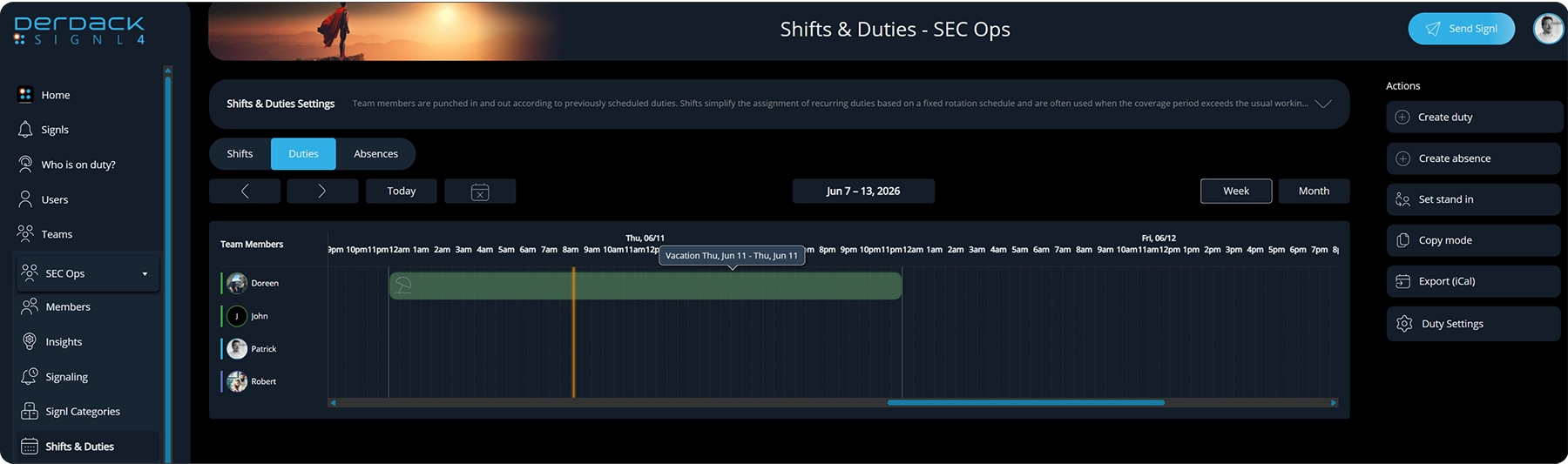
3. It will then show on the schedule as an absence.
Bringing It All Together
Duty scheduling is more than a calendar. It is the mechanism that connects alerts to the people responsible for responding.
When schedules are clearly defined, responsibilities become predictable. Coverage gaps are reduced, handoffs become smoother, and teams spend less time figuring out who should respond.
With SIGNL4, shifts define when coverage is needed, duties define who is responsible, and stand-ins provide flexibility when plans change.
The result is a structured, automated approach to coverage management that ensures responsibility is always clear, even as schedules change.
Key Benefits
- Clear ownership of alerts and incidents
- Consistent coverage across teams and time zones
- Reduced risk of missed alerts
- Simplified vacation and absence management
- Automatic assignment of responsibility based on current duty schedules
- Improved operational reliability
Effective incident response starts long before an alert is generated. When schedules are properly maintained, teams know who is responsible, coverage gaps are minimized, and alerts can be turned into action without unnecessary delays.