
A good alerting strategy is an important prerequisite for successful operations management and the availability of mission-critical systems. But also for employee satisfaction. It’s not just about sending out alerts upon critical conditions, problems and failures at all, but more importantly, about how it is done. Here are the 5 most typical mistakes, their consequences and how to avoid them.
1. No alerting at all, too few or too late

This is, of course, a problem. If critical conditions or incidents are overlooked, this quickly leads to major problems with dramatic consequences, including damages, high downtime costs or loss of productivity. Too few alarms are often caused by inadequate monitoring of critical systems or breaks in the reporting chain. For instance, it is no exception that simple gatekeepers of manufacturing plants have to observe critical signals or reporting systems during a night shift. If something bad happens, they are required to manually call a hotline to get hold of a service technician or emergency team who can help.
-> How to avoid mistake #1
Everything really starts with monitoring, and this is not a trivial task. Fortunately, powerful monitoring systems have always existed in IT. The Internet of Things (IoT) now also provides a cost-effective way of monitoring a large number of system in industrial environments, facility management and many other areas, previously not adequately equipped for automated monitoring (just think of stack lights of industrial machinery). It is obvious that monitoring as well as the alarming should be as automated as possible and without breaks. Human “latencies” and errors should be excluded as far as possible.
2. Too many alerts
When even the most insignificant incidents are alerted to an on-call team at night, the acceptance of being alerted plummets. Nothing is more frustrating than being called out of bed in the middle of the night for an insignificant database error. This can lead to “alert burnout” or “alert fatigue” and, in the end, even have valuable IT staff cancelling contracts and leaving. No one wants this.
-> How to avoid mistake #2

Avoiding this mistake is definitely more challenging than dealing with mistake #1, because here we are talking about filtering alarms/events, i.e. fine control of monitoring. In other words, avoiding “false positives”, i.e. false alarms. Tools like rule-based alerting policies, content filters but also features like de-duplication or “wait for recovery” mechanisms or even correlation of events and alerts help here. The latter means that a fault often has a multitude of effects and these then all trigger alarms on their own, although one alarm to a maintenance team might be enough. Event correlation, however, is not trivial. These capabilities should be available in either the monitoring tool or the alerting product. Current trends such as AIOps promise to reduce false alarms and provide correlation but must prove that they do not filter out critical alarms in any case.
3. Too many people get alerted
This is the close relative of mistake #2. In combination, the two are definitely “lethal” to any on-call team. No one wants to receive alerts that are not in their area of responsibility. There is also the problem of what is known as the “broadcast dilemma.” If several people see themselves in a situation requiring their help or assistance, the willingness to help decreases with the number of people. If only one person is informed and this person knows that he or she is the only one, then the willingness to help or solve a problem is greatest.
Furthermore, this mistake leads to “alert fatigue” in the same way as mistake 2. Alternatively, it can lead to the “fox in the henhouse” problem. All alerted people are agitated and the chaos created avoids effective problem solving.
-> How to avoid mistake #3
Avoiding this mistake is a typical task of a good alerting solution but also of a good alerting strategy. It is always the easiest approach to include all persons who could possibly help or are interested in being part of an alarm distribution list. However, because of the negative effects, it is strongly advisable to set up a targeted alerting system. This includes alerting people according to an on-call or shift schedule, alerting according to responsibilities, local availability (geolocation), or even according to proper training or skills needed to resolve the specific incident. Modern alerting solutions increasingly offer such functions to ensure clear responsibilities in the event of an alarm.
4. Nobody knows that status of an alert or service tasks
If several people in a team are alerted for certain reasons, e.g. in machine maintenance, it is not sufficient to send the alarm or service order to all team members and then to not communicate the status. A system in which several people are informed, and one person can acknowledge or “pull” a service task, must inform all other team members of the acceptance, otherwise waste work will be created, e.g. by the fact that two or even more team members believe they must take care of an alarm or service assignment.
-> How to avoid mistake #4
Only transparency helps here, and it is important that every team member can view the status of an alarm or a service job at any time. Ideally, this is possible for mobile employees regardless of location, e.g. via a mobile app that displays all alarms and service orders with acknowledgements and status. Acknowledging an order or alarm is ideally displayed and communicated in real time to avoid even the slightest extra work, confusion, or distraction, allowing the team to work as efficiently as possible without awkward follow-ups.
The problem is that most basic notification systems like email, text messages or chat messages are stateless, i.e. do not track status updates and acknowledgement. So, they render useless and lead to this particular alerting problem.
5. Critical alerts are not communicated in a critical way
In any case, it is also dramatic if a critical alarm or incident is overlooked. So, if all previous solutions are implemented, there still remains the problem that an alarm is simply not communicated properly or drastically enough and simply goes down – possibly with dramatic consequences.
-> How to avoid mistake #5
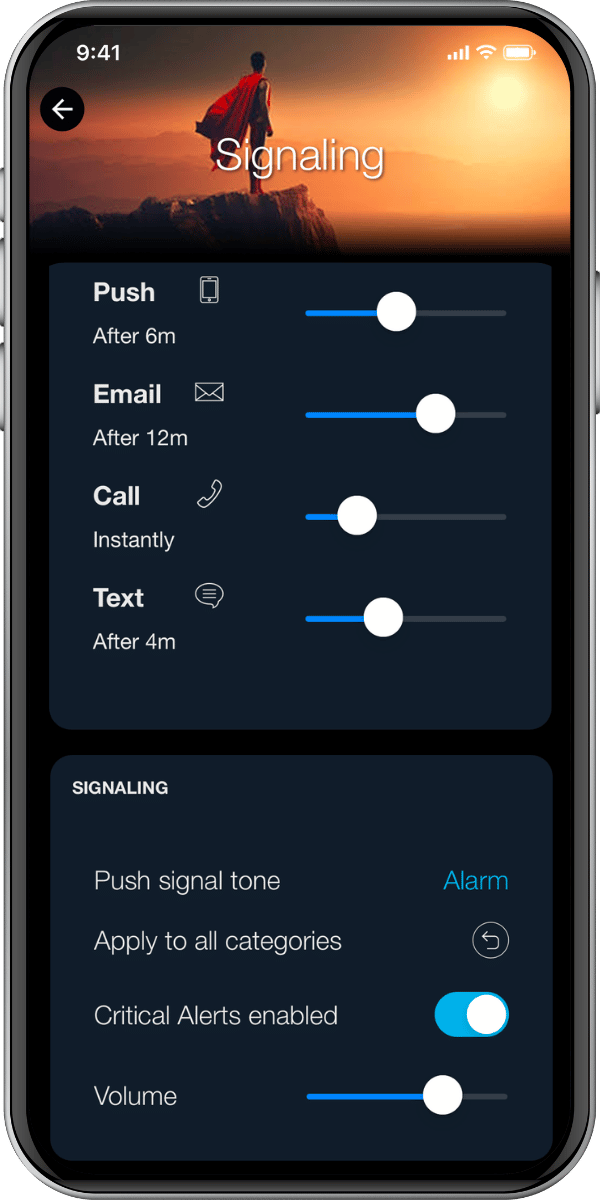
Critical alerts should certainly not be sent by e-mail. And messengers and chat systems are also not adequate communication channels when there is something “on fire”. At night or in noisy environments (e.g., production facilities), it must be ensured that an alarm is not overheard. Here, too, special alarm and alerting products play a decisive role. The use and combination of different means of communication such as calls, push messages, SMS and chat messages is an essential function to deliver alarm messages safely. Repeated (persistent) alerts requiring an acknowledgement by the user are also important. Such tracking is essential to escalate when a response time is exceeded, such as to notify a teammate or supervisor. For mobile apps, the ability of override the “mute” button is essential, too.
How can SIGNL4 help?
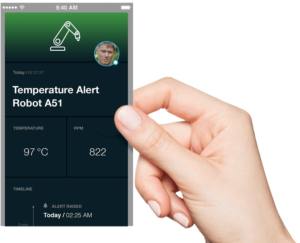 Being a reliable and mature cloud solution, SIGNL4 can comprehensively address problems 2-5 and help avoiding typical mistakes in critical alerting. Furthermore, monitoring systems and sensors in IT, production, energy supply, logistics, building management and many other areas can be connected quickly and easily via numerous powerful interfaces. SIGNL4 offers functions for filtering events, for targeted alerting, for transparent acknowledgement of alarms and service orders and, of course, above all for reliable and secure alerting at the decisive moments.
Please, check out all features of SIGNL4 and it helps to solve the alerting challenge.