

December 2021 Update – On-duty board, Manual Signls and Azure Sentinel update

Dec 2, 2021 | Updates

Our December update brings a ‘Who is on duty’ board displaying current team members on duty with contact information. In addition, we have simplified the manual sending of Signls and improved the integration with Azure Sentinel. As always, you can find all the details in this article.

Who is on duty?

We now answer this central question with a new on-duty board under the menu item of the same name. It lists all teams each with its members currently on duty.

They are displayed on each tile segmented by the expiration of their current duty period and length So, for example, if the team is not using the handover assistant, it will show for each user how long they will be on duty according to the duty schedule (the end of the scheduled shift). Otherwise, it is displayed how long the current team will stay on duty until it is handed over to the next incoming team (handover time). Users who have punched in on an ad-hoc basis are displayed without any time-related information.
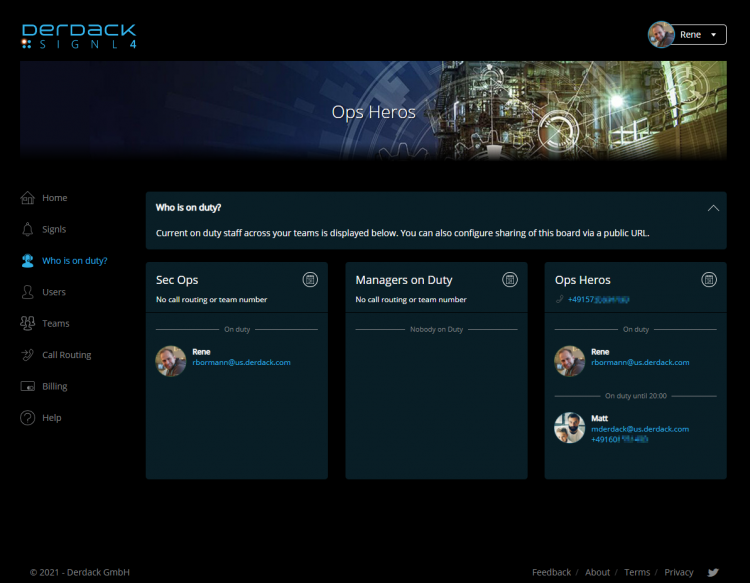
Who is on call dashboard Update 2021

To hide a team from the board, you can simply deactivate the display on the board in the respective team settings (Teams > Team name -> Settings) under Privacy > Publish team to ‘Who is on duty’. If the switch is deactivated, the team will not be displayed in the board.

If your team has a call forwarding number, it will be displayed under the team’s name. In this case, it may make sense to no longer display personal phone numbers of team members. To hide personal phone numbers, deactivate the switch Display phone numbers on ‘Who is on duty’.

Clicking on the calendar icon will take you directly to the duty scheduler of the according team (if you have access rights to it).
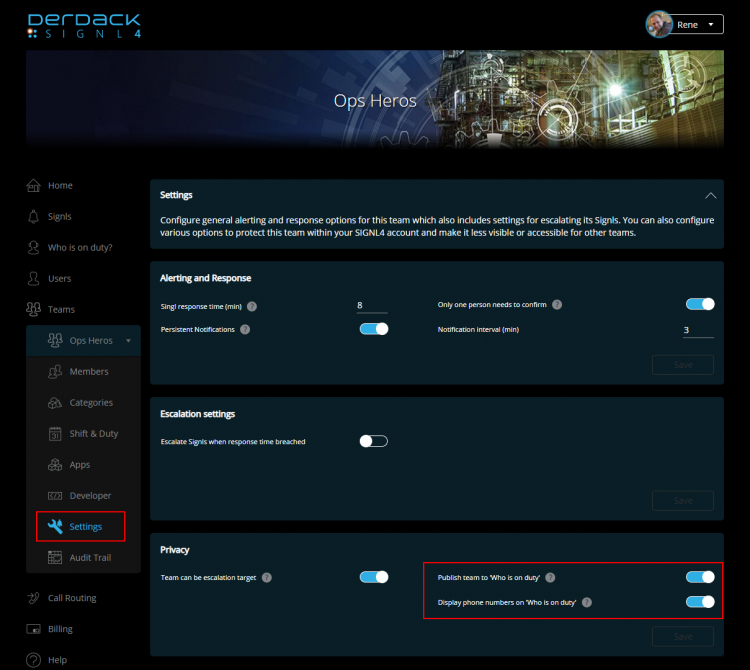
Who is on call settings in SIGNL4

The on-duty board can be accessed by all users in the subscription and is included in every SIGNL4 plan.

Board sharing via public link

In addition to the internal board, there is also a feature that allows you to share it with external partners, customers or your SOC/NOC team without requiring a SIGNL4 account.

Simply expand the header on the ‘Who is on duty’ page and activate the toggle “Share board via public link“. You will see a public link that you can copy and share with your partners or customers. In the field “Custom board name” you can give your board a name, which will then also be displayed on the public board.
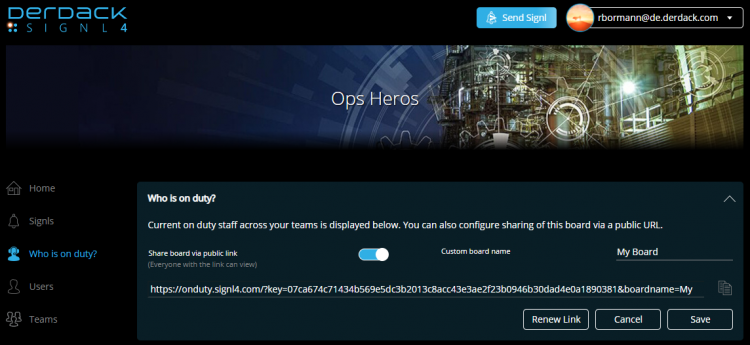
Who is on call public SIGNL4

The board contains the same content as the internal overview, is responsive and therefore integrates well with existing web pages. Please note that public board sharing requires our maximize plan.
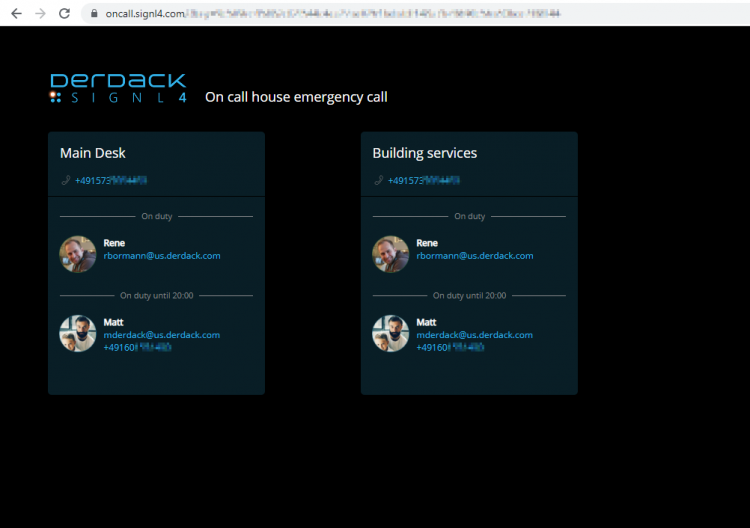
Who is on call public in SIGNL4

Simplified manual Signl sending

You can send new Signls much easier from everywhere in the portal. Just click the new button at the top of the page next to your user account. On the manual Signl form, we added the option to pre-select an alert category. This overrides the automated key-word algorithm assigning a category based on the content of the message.
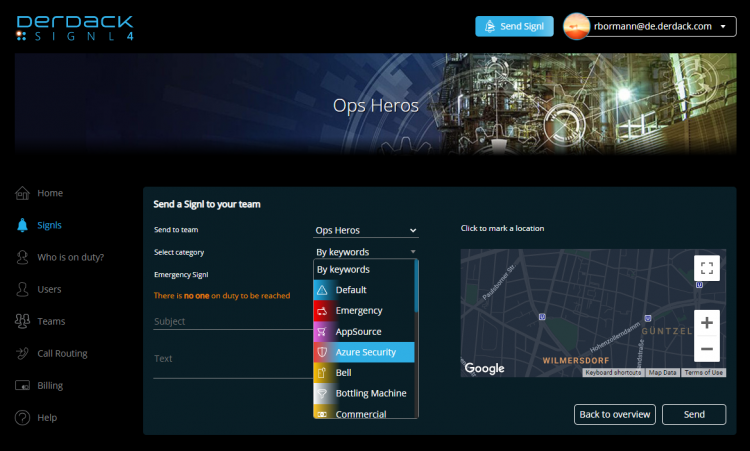
Signls in SIGNL4 Update 2021

BTW – pssst. We are also working on templates for manual Signl sending….

Azure Sentinel Updates

Our Azure Sentinel connector has been enhanced with some features for 2-way integration:

  • When acknowledging or closing a Signl in SIGNL4, the corresponding user in Sentinel is now also assigned as owner to the incident
  • Comments from the Signl chat are now also commented on the Sentinel incident
  • If an incident in Sentinel is acknowledged or closed in SIGNL4 after Signl creation, the Signl status in SIGNL4 is automatically updated as well
  • You can now configure the connector so that after the Signl creation, the corresponding Sentinel incident gets new tags
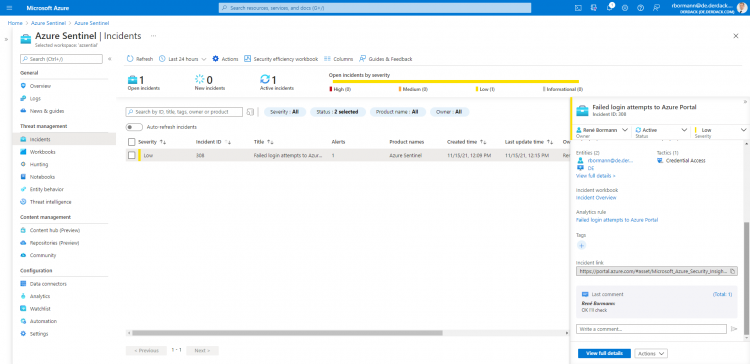

Sentinel SIGNL4

Discover SIGNL4

Dashboard of SIGNL4's mobile Alerting App

Stay ahead of critical incidents with SIGNL4 and its superpowers. SIGNL4 provides superior and automated mobile alerting, delivers alerts to the right people at the right time and enables operations teams to respond and to manage incidents from anywhere.

Learn more about SIGNL4 and start your free 30-days trial.

    Alerting and Response for Modern Operations

    Feature Overview

    A comprehensive Platform for mobile Alerting for an up to 10x faster Response

    AIOps and AI Alerting

    AI-powered Alerting and Alert & Incident Management

    Reliable Alert Notifications

    Alert Notifications by push, text, voice and email. With Tracking and Escalations

    Mobile Alerting App

    The modern Way of receiving and managing critical Alerts on-the-go

    On-Call Scheduling

    Ai-powered Scheduling and Management of On-Call Duties and Shifts

    Call Routing

    Live call routing and a Voice Mailbox for modern after-business Hours Operations

      Use Cases

      IT Alerting

      Stay ahead of critical IT incidents and minimize downtime with SIGNL4 – automated, secure, and in real-time

      Incident Management

      Accelerate response, and streamline incident workflows with real-time mobile alerts

      SecOps Alerting

      Respond faster to cyber threats with mobile-first alerting

      Incident Alerting for MSPs

      Turn Detection into Accountable Response

        IoT Service Alerting

        Automatically alert and notify your field service teams based on real-time signals from your IoT sensors and devices

        SCADA Alarm Notifications

        Respond faster to machine breakdowns, quality issues, and maintenance calls

        Field Service Alerting

        Automated Mobile Routing of Service Requests and Alerts to Field Teams

        On-Call Management

        Create and manage duty schedules, automate alert delivery, escalate seamlessly, and route after-hours calls

        Building Automation

        Ensure fast response, fewer disruptions, and better facility management and service

        After-Hours Call Routing

        SIGNL4 automatically routes after-hours calls to on-call staff – ensuring timely response and 24/7 coverage

        Emergency Alerting

        Keep your teams prepared when every second counts. SIGNL4 delivers fast, reliable emergency notifications

        Alert Management

        A central alert management hub helps to streamline alerting processes from multiple enterprise systems

        Integrations and APIs

        Integrations Overview

        We have verified and tested 200+ Integrations with 3d Party Products

        EMail (SMTP)

        The fastest and easiest way to connect to SIGNL4.

        Webhook

        SIGNL4’s most popular and flexible integration

        REST API

        Seamlessly integrate services or implement additional features

          Selected Customer Case Studies

          Berlin-Brandenburg Airport

          Automated Alerts and Mobile Incident Response for Luggage Transportation Systems

          BASF Coatings

          Automated Transport Dispatching with IoT Buttons and a mobile App for optimized Intralogistics

          RedIron, Canada

          Unifying Alerts and Notifications in mission-critical IT Operations

          CSP Lighthouse, Australia

          Reliable 24/7 Alerting for a global Cybersecurity Service Provider

            Swiss Bankers, Switzerland

            Real-Time Fraud Prevention with 24/7 mobile alerting in Financial Services Operation

            Conexus Credit Union, Canada

            Conexus transformed Incident Response in a Single Day with SIGNL4

            Overview of Industries

            Exciting case studies from selected customers in sectors such as logistics, aviation, manufacturing, finance and IT

            About us

            About Derdack & SIGNL4

            Learn more about a Market Leader in mobile Alerting and Anywhere Incident Response for critical Systems

            Partner Program

            Become a SIGNL4 Partner and take Advantage of a well-established and rapidly growing Product

            Newsletter

            Get Updates, exciting Insights, and Customer Stories – Sign up for our Newsletter!

            Glossary

            We explain the most important Terms and Topics in the Field of Alerting and Incident Management

            Blog

            Our blog offers expert insights and practical tips for getting the most out of SIGNL4

              G2 honors SIGNL4 with a variety of awards.
              DERDACK SIGNL4
              Privacy Overview

              This website uses cookies so that we can provide you with the best user experience possible. Cookie information is stored in your browser and performs functions such as recognising you when you return to our website and helping our team to understand which sections of the website you find most interesting and useful.