
C# code for the SIGNL4 webhook

Sep 1, 2017 | Developer, DevOps, OT & IoT

When I started with my first Raspberry mini computer, I selected Windows 10 IoT Core as the operating system. This allowed for using Visual Studio and C#. It is not that difficult to call a webhook from your C# code, though a couple of pitfalls await you when your build your Raspberry project (I connected a temperature/humidity sensor and wanted to send regular data from my office room via SIGNL4).

Here is what the C# code looks like.

First of all, we need to define the webhook URL:

private const string Signl4APIUrl = "https://connect.signl4.com/webhook/hfj745kd";

Note that “hfj45kd” represents the unique identifier of the team you wish to send notification to (the ‘team secret’).

Then, we need to define our JSON object which will contain the data for the webhook call:

 [JsonObject]
        public class Data
        {
            [JsonProperty(Order = 5)]
            public string Location { get; set; }
            [JsonProperty(Order = 4)]
            public string Humidity { get; set; }
            [JsonProperty(Order = 3)]
            public string Temperature { get; set; }
            [JsonProperty(Order = 2)]
            public string Body { get; set; }
            [JsonProperty(Order = 1)]
            public string Title { get; set; }
        }

The next sniplet is where you assemble the JSON object and fill it with values:

var data = new Data 
{
 // this is a specific object containing data read from the sensor
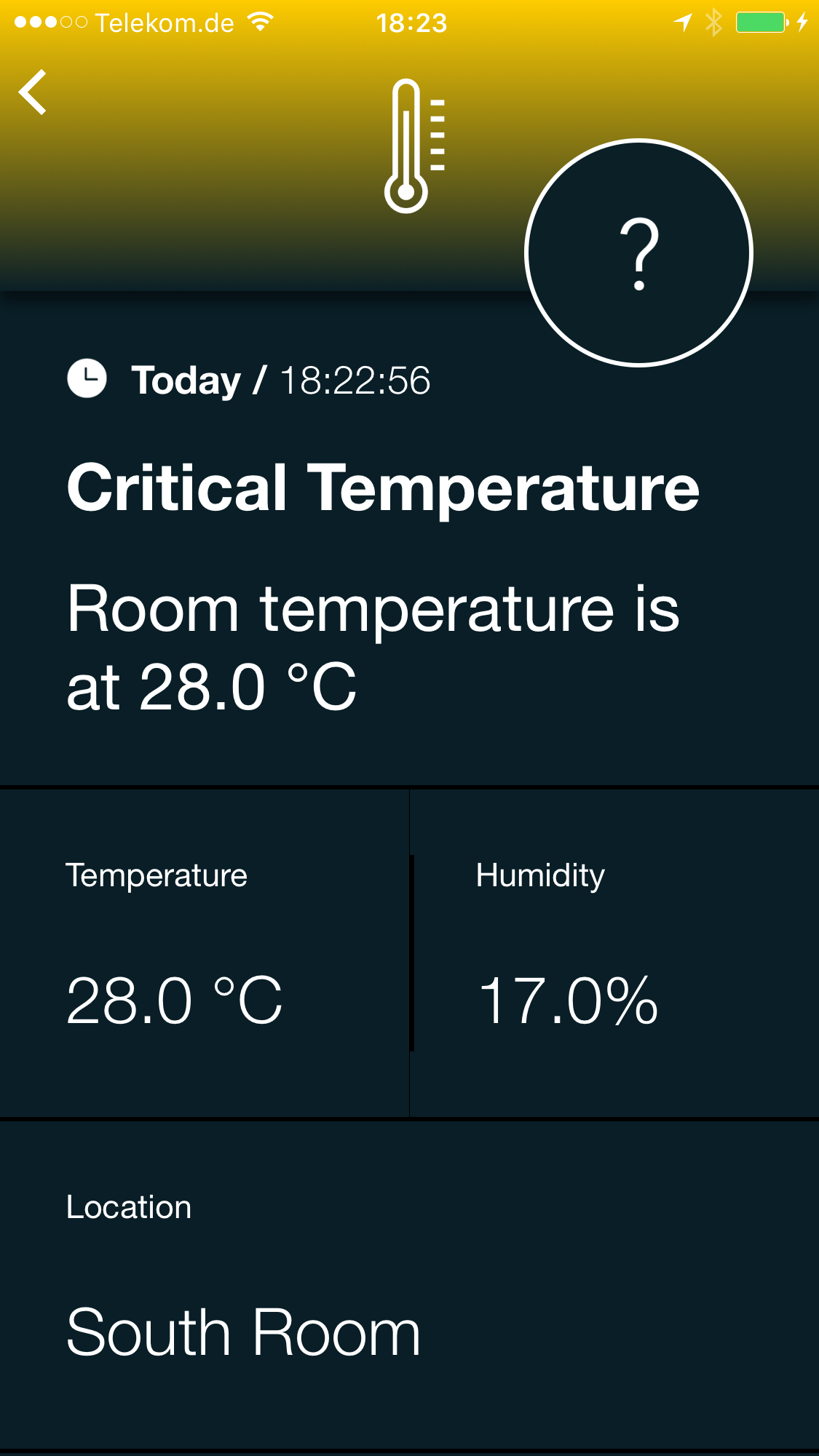
  Title = "Critical Temperature",
  Body = "Room temperature is at " + string.Format("{0:0.0} °C", this.Temperature),
  Temperature = string.Format("{0:0.0} °C", this.Temperature),
  Humidity = string.Format("{0:0.0}%", this.Humidity),
  Location = "South Room"
};

try
{
  var response = await PostAsync(Signl4APIUrl, data);
  if (response == null)
  {
    return;
  }
  await response.Content.ReadAsStringAsync();
}
catch (Exception ex)
{
  // do something 
}

Above code contains a reference to a method “PostAsync”. Here it is:

public static async Task<HttpResponseMessage> PostAsync<T>(string strUrl, T content)
{
  var client = new HttpClient(new HttpClientHandler { AutomaticDecompression = DecompressionMethods.GZip | DecompressionMethods.Deflate });
  HttpContent httpContent = null;
  if (content != null)
  {
   httpContent = new StringContent(JsonConvert.SerializeObject(content), Encoding.UTF8, "application/json");
  }
    return await client.PostAsync(strUrl, httpContent);
}

BTW, you need to include the following use statements:

using System.Net;
using System.Net.Http;
using System.Threading.Tasks;
using System.Text;
using Newtonsoft.Json;

Your projects package manifest needs to include “Internet (Client)” in the Capabilities section.

And here is what the result should look like in your SIGNL4 app (assuming you have created a Service/System triggering on ‘Temperature’).
Temperatur Alert

Happy Coding!

Thanks, to Kay, Tino and our Dev Team for their support!

Discover SIGNL4

Dashboard of SIGNL4's mobile Alerting App

Stay ahead of critical incidents with SIGNL4 and its superpowers. SIGNL4 provides superior and automated mobile alerting, delivers alerts to the right people at the right time and enables operations teams to respond and to manage incidents from anywhere.

Learn more about SIGNL4 and start your free 30-days trial.

    Mobile Alerting & Anywhere Incident Response

    Feature Overview

    A comprehensive Platform for mobile Alerting for an up to 10x faster Response

    AIOps and AI Alerting

    AI-powered Alerting and Alert & Incident Management

    Reliable Alert Notifications

    Alert Notifications by push, text, voice and email. With Tracking and Escalations

    Alerting App

    The modern Way of receiving and managing critical Alerts on-the-go

    On-Call Scheduling

    Ai-powered Scheduling and Management of On-Call Duties and Shifts

    Call Routing

    Live call routing and a Voice Mailbox for modern after-business Hours Operations

      Use Cases

      IT Alerting

      Stay ahead of critical IT incidents and minimize downtime with SIGNL4 – automated, secure, and in real-time

      Incident Management

      Accelerate response, and streamline incident workflows with real-time mobile alerts

      SecOps Alerting

      Respond faster to cyber threats with mobile-first alerting

      SCADA Alarm Notifications

      Respond faster to machine breakdowns, quality issues, and maintenance calls

        IoT Service Alerting

        Automatically alert and notify your field service teams based on real-time signals from your IoT sensors and devices

        Field Service Alerting

        Automated Mobile Routing of Service Requests and Alerts to Field Teams

        On-Call Management

        Create and manage duty schedules, automate alert delivery, escalate seamlessly, and route after-hours calls

        After-Hours Call Routing

        SIGNL4 automatically routes after-hours calls to on-call staff – ensuring timely response and 24/7 coverage

        Building Automation

        Ensure fast response, fewer disruptions, and better facility management and service

        Emergency Alerting

        Keep your teams prepared when every second counts. SIGNL4 delivers fast, reliable emergency notifications

        Alert Management

        A central alert management hub helps to streamline alerting processes from multiple enterprise systems

        Integrations and APIs

        Integrations Overview

        We have verified and tested 200+ Integrations with 3d Party Products

        EMail (SMTP)

        The fastest and easiest way to connect to SIGNL4.

        REST API

        Seamlessly integrate services or implement additional features

        Webhook

        SIGNL4’s most popular and flexible integration

          Selected Customer Case Studies

          Airport Berlin-Brandenburg

          Automated Alerts and Mobile Incident Response for Luggage Transportation Systems

          BASF Coatings

          Automated Transport Dispatching with IoT Buttons and a mobile App for optimized Intralogistics

          RedIron, Canada

          Unifying Alerts and Notifications in mission-critical IT Operations

          CSP Lighthouse, Australia

          Reliable 24/7 Alerting for a global Cybersecurity Service Provider

            Swiss Bankers, Switzerland

            Real-Time Fraud Prevention with 24/7 mobile alerting in Financial Services Operation

            Conexus Credit Union, Canada

            Conexus transformed Incident Response in a Single Day with SIGNL4

            Overview of Industries

            Exciting case studies from selected customers in sectors such as logistics, aviation, manufacturing, finance and IT

            About us

            About Derdack & SIGNL4

            Learn more about a Market Leader in mobile Alerting and Anywhere Incident Response for critical Systems

            Partner Program

            Become a SIGNL4 Partner and take Advantage of a well-established and rapidly growing Product

            Newsletter

            Get Updates, exciting Insights, and Customer Stories – Sign up for our Newsletter!

            Glossary

            We explain the most important Terms and Topics in the Field of Alerting and Incident Management

            Blog

            Our blog offers expert insights and practical tips for getting the most out of SIGNL4

              SIGNL4 got recognized by the G2 Community
              DERDACK SIGNL4
              Privacy Overview

              This website uses cookies so that we can provide you with the best user experience possible. Cookie information is stored in your browser and performs functions such as recognising you when you return to our website and helping our team to understand which sections of the website you find most interesting and useful.