

TL;DR: Incident response software ensures critical alerts reach a live responder, confirms acknowledgment, and escalates when there is no response. For 24/7 IT teams, the evaluation framework requires alert routing tied to current shift schedules, persistent mobile delivery that bypasses Do Not Disturb, automated escalation chains, and audit logs that prove who was notified and when. SIGNL4 delivers these capabilities starting at $9 per user per month with a 30-day full-feature trial.
Most outages don’t last because the fix is hard. They last because the right person never hears about the problem. An alert that lands in a crowded inbox or on a silenced phone is just noise, and every minute it goes unanswered adds to your downtime. We close that gap. Our platform sits between your monitoring tools and your people, getting every critical alert to a live responder, confirming they acknowledge it, escalating when it is ignored, and building an audit trail that holds up under compliance review.
Defining modern incident response software
We built incident response software as the response layer between your monitoring stack and your people. Monitoring tools (Nagios, Zabbix, PRTG) detect anomalies. ITSM platforms (ServiceNow, Jira) track tickets. Incident response software mobilizes humans immediately when those systems detect something critical.
Our core job is confirmed human acknowledgment, not just message delivery. Email and chat notifications fail this test because they offer no acknowledgment signal and do not bypass Do Not Disturb settings. A true incident response platform ensures the alert bypasses silence, tracks who acknowledged it and when, and escalates automatically if the primary responder does not react within your defined window.
We define this category as the intersection of alerting, escalation, and on-call scheduling. Unlike generic notification tools, we maintain an audit log of every delivery attempt, acknowledgment, and escalation event, creating the accountability chain that 24/7 operations require. SIGNL4’s approach to incident management focuses specifically on this mobilization layer rather than ticketing or workflow management.
Key incident response platform features
When evaluating incident response tools, look for these essential capabilities:
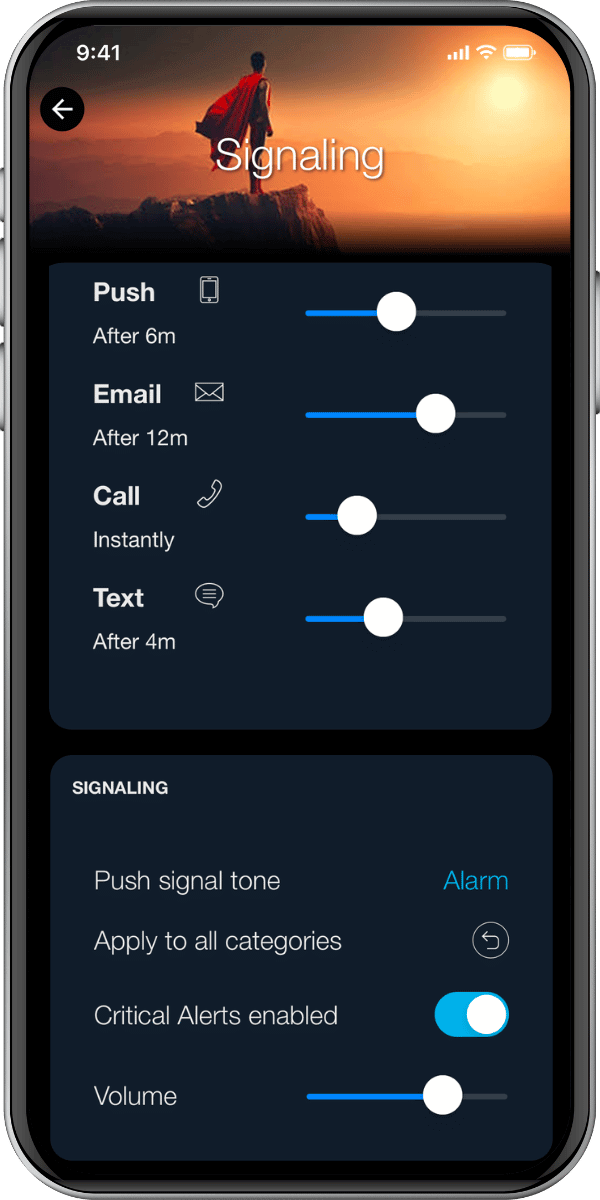
- Persistent mobile alerting: Delivery via push, SMS, and voice that bypasses Do Not Disturb on iOS and Android, ensuring a critical SCADA alarm does not disappear into a silenced phone at 3 a.m.
- Automated escalation chains: If the primary on-call technician does not acknowledge within five minutes, the alert routes to the backup automatically without manual intervention.
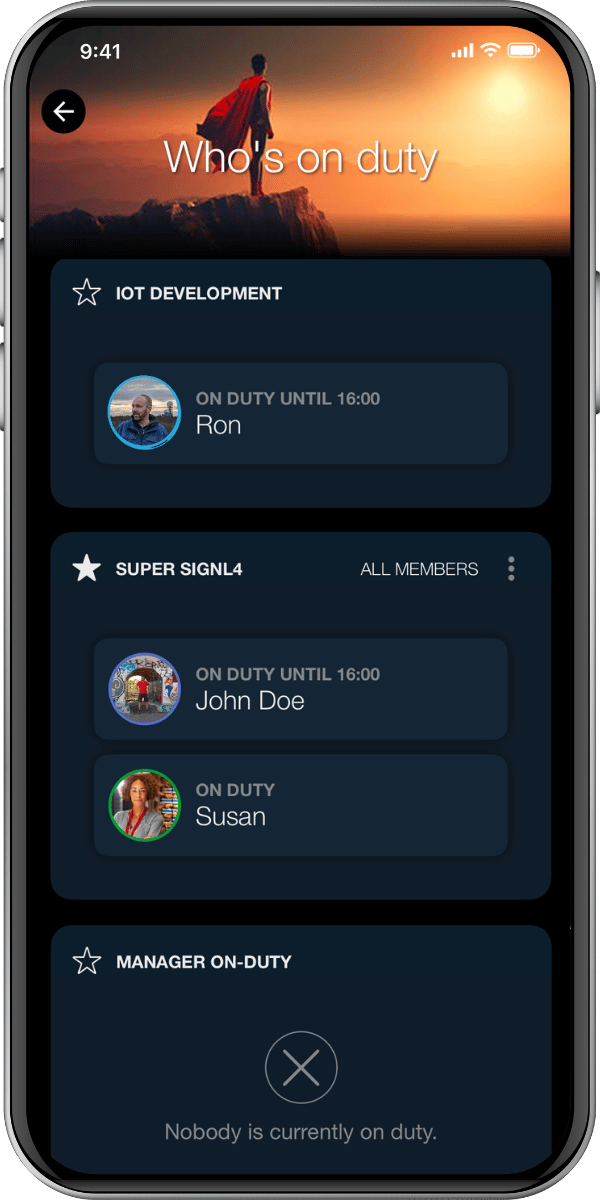
- Shift-aware routing: Alerts route based on who is actually on duty right now, not a static contact list that was last updated three months ago.
- Acknowledgment tracking: Explicit confirmation that a specific person received and accepted responsibility, with timestamps for compliance records.
- Native integrations: Connectors for your monitoring stack and ticketing systems (ServiceNow, ConnectWise) that preserve alert context without webhook workarounds. Two-way integrations sync acknowledgments and user actions back into the source system, so records there stay up to date.
- Audit logs: Immutable records of who was notified, when they acknowledged, and what actions they took, retained per compliance needs.
Incident response vs. ticketing
The distinction matters when evaluating tools. If you need work queue management, you need ITSM. If you need guaranteed human response at 2 a.m., you need incident response software.
| Aspect | Incident response software | Ticketing / ITSM |
|---|---|---|
| Primary purpose | Mobilize humans to respond now | Track work items through resolution |
| Trigger | Critical alert from monitoring | User request or logged issue |
| Time sensitivity | Seconds to minutes | Hours to days |
| Primary user | On-call engineer, SOC analyst | Service desk, support team |
A ticket can wait until morning. A critical alert cannot.
Key users of incident response software
We serve specific operational roles, each with distinct alerting and escalation requirements:
- IT Operations Managers: Own the alert queue and escalation policies, needing proof that overnight alerts were acknowledged and coverage gaps are closed.
- SOC Analysts: Monitor security events from SIEM and EDR tools, requiring critical alerts to reach the right responder on duty without delay.
- MSP Technicians: Handle alerts from multiple customer environments, needing routing that respects different SLAs per client.
- OT/SCADA Operators: Manage manufacturing and utility systems, requiring alerts from PLCs and SCADA systems to reach field technicians who are not at desks.
Why 24/7 teams need specialized incident response tools
Around-the-clock operations introduce failure modes absent in 9-to-5 environments: reduced staffing, devices set to silent, and fatigue. Email lacks an acknowledgment signal and may land in spam. Chat platforms like Teams or Slack serve as coordination channels but do not bypass Do Not Disturb, do not escalate automatically, and do not provide compliance-grade audit trails.
We address these gaps by providing persistent delivery with acknowledgment tracking, treating an unacknowledged alert as an open incident requiring escalation, not a sent message that might have been seen. Our alerting and response process ensures that when an alert fires, a human being confirms receipt within minutes, or the system escalates automatically until someone does.
Quantifying the impact of alert gaps
When an alert goes unacknowledged, downtime extends, translating directly to missed SLAs, regulatory exposure, and reputational damage.
Berlin-Brandenburg Airport processes more than 18,000 system messages per day through SIGNL4. Their operational target requires technicians to acknowledge technical or baggage-related fault alarms within one minute and begin resolving issues within three minutes. At this scale, manual verification is impossible. The system must guarantee reach and automatically escalate when acknowledgment does not occur.
Coverage gaps during shift handoffs
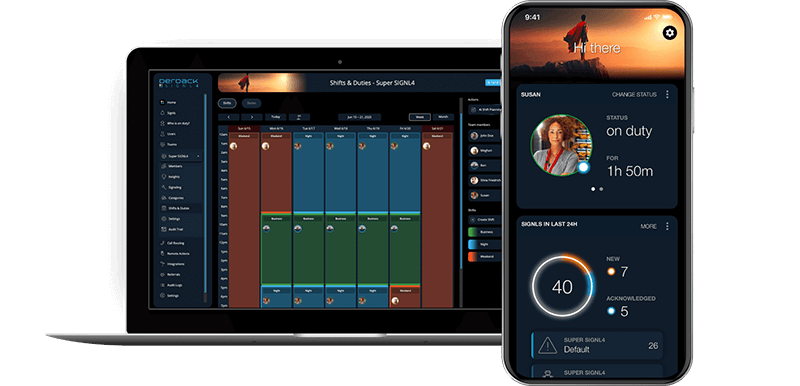
The most common escalation failure in 24/7 operations is an alert routing to a technician who went off-shift 20 minutes ago. When your primary on-call finishes at 6 a.m. but the alert fires at 6:15 a.m., a static list still routes to them. If they are driving home or asleep, the alert sits unacknowledged.
Shift-aware routing solves this by tying escalation logic directly to duty schedules. When the schedule updates, routing updates automatically. Our Optimize plan handles this with recurring rotations and ad-hoc overrides. When your technician calls in sick at 5 a.m., you update the override in the mobile app, and the next alert routes to the substitute without touching your escalation chain configuration.
Key capabilities for reliable alerting
We built these capabilities specifically to close the gaps generic notification tools leave open in 24/7 operations.
Configuring automated escalation chains
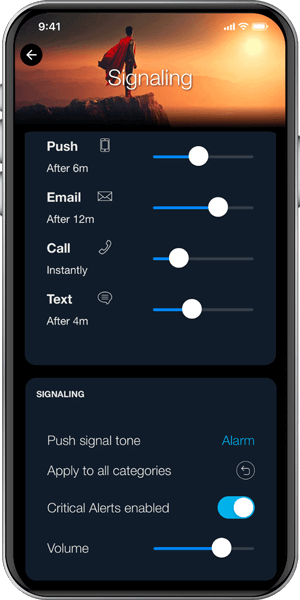
Escalation works like a pre-defined call tree that fires automatically. You define the tiers and set the timeout thresholds, so the escalation flows through three defined steps:
- Primary acknowledgment window: Alert fires to on-call technician with 5-15 minute timeout.
- Backup escalation: If no acknowledgment, alert routes to backup engineer automatically.
- Manager escalation: If backup does not acknowledge, escalation manager receives alert with full context of prior delivery attempts.
We track each step, so you know exactly where the chain broke if a critical alert went unanswered.
Connecting monitoring and ticketing tools
Your platform must connect to your existing stack without custom scripting. Native integrations preserve alert context, severity levels, and metadata that generic webhooks often lose.
Look for pre-built connectors for Zabbix, PRTG, Nagios, Checkmk, ServiceNow, Microsoft Sentinel, and your chat platforms. Two-way connectors allow bidirectional sync, so acknowledging an alert updates the ticket in your ITSM tool automatically.
How to audit your alert escalation logic
Before evaluating new tools, audit your current escalation logic to identify specific gaps.
Verifying iOS and Android mute override
Test DND bypass by configuring a test alert, setting your phone to Do Not Disturb, and triggering the alert to verify the device makes noise. iOS requires specific entitlements for Critical Alerts; Android uses high-priority notification channels. Your software should handle these platform specifics automatically without requiring manual device configuration.
Audit trails for alert response
A complete audit trail includes five elements: alert timestamp, delivery confirmation, acknowledgment timestamp, escalation events, and resolution time. When testing, trigger a test alert and verify all five appear in the log immediately. Verify you can export these logs during compliance audits, you need records, not screenshots.
Testing your alert escalation chain
Run a live fire drill during your trial. Silence the primary responder’s phone and trigger a test alert. Verify the escalation fires to the backup after your configured timeout, and confirm the backup receives it. Then have the primary acknowledge and verify the alert does not escalate. Document the results to prove whether the logic works when needed.
Connecting SCADA and IT monitoring without custom scripts
Your IT monitoring and OT/SCADA systems generate alerts in different formats. IT systems use REST APIs and webhooks, while SCADA systems run industrial protocols on isolated networks. Bridging these environments traditionally required custom scripts that broke when source systems updated. We solve this with native connectors for IT tools and the SIGNL4 Edge Proxy, bringing both alert streams into one mobile response layer without opening your control network to the internet.
Automating monitoring alert ingestion
Native integrations pull alerts from Zabbix, PRTG, Nagios, and Checkmk without webhook workarounds, preserving severity levels, host names, and custom tags exactly as configured. This context is critical for triage. A generic webhook might send “Alert: Server 42.” A native integration delivers all available event and alert parameters, which you can customize and augment in SIGNL4, so the responder gets a truly actionable alert rather than a generic summary line.
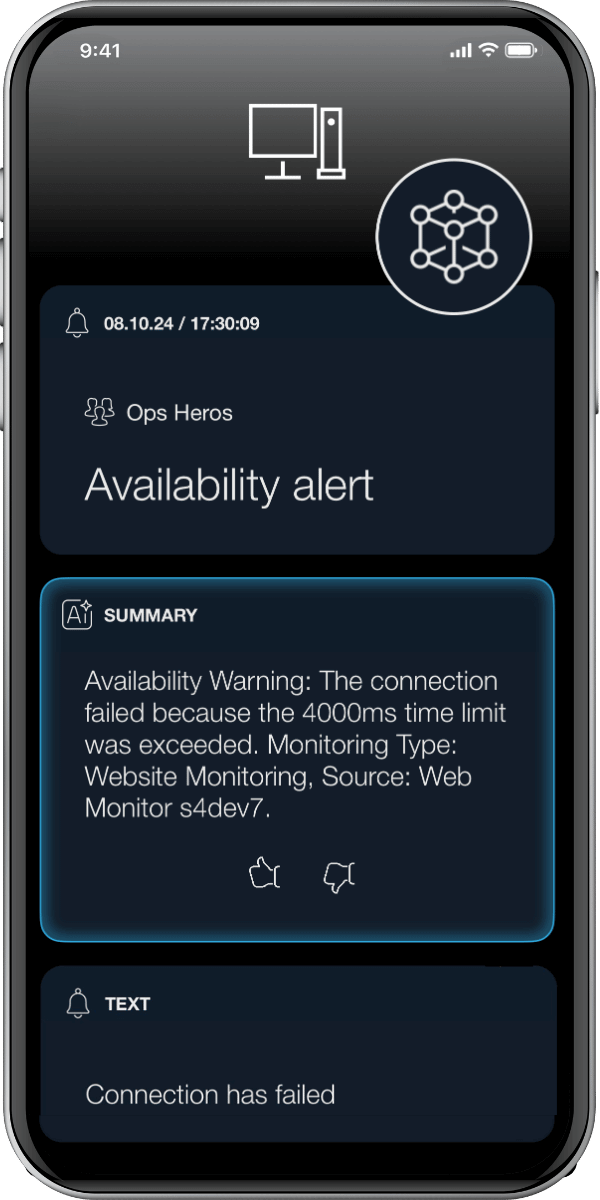
This context compression drove real operational gains for BASF Coatings, cutting their average incident pickup time from 3 hours to 45 minutes and delivering 10x ROI through faster response and mid-five-digit annual savings from reduced downtime.
SIEM and EDR data for incident triage
Security teams need critical security alerts to reach the right responder immediately. Microsoft Sentinel and other SIEM tools generate high volumes of events; only critical ones should wake someone up. Incident response software filters based on severity and routes to the security analyst on duty, not the entire team.
Custom API and webhook integrations
For everything else, REST API and generic webhook options provide connectivity for legacy systems or custom applications lacking native connectors. The API supports inbound alerts (triggering notifications) and outbound status updates (confirming resolutions).
Comparing incident management platform features
When evaluating platforms, compare these criteria. Pricing shown is entry-level paid tier, billed annually.
| Platform | Mobile alerting | On-call scheduling | Entry price |
|---|---|---|---|
| SIGNL4 | Persistent push, SMS, voice with DND bypass | Native, included | $9/user/month |
| PagerDuty | Push, SMS, phone | Advanced | ~$21/user/month |
| Opsgenie | Push, SMS, voice | Included | ~$9/user/month |
| VictorOps | Push, SMS, voice | Included | ~$5/user/month |
| Platform | Trial duration | Full-feature trial | Compliance certifications |
|---|---|---|---|
| SIGNL4 | 30 days | Yes (Maximize features) | ISO 27001, TISAX, GDPR |
| PagerDuty | 14 days | Professional features | SOC 2, ISO 27001 |
| Opsgenie | 14 days | Standard features | SOC 2, ISO 27001 |
How SIGNL4 handles mobile on-call
We differentiate through mobile-first design. The iOS app is rated 4.5 out of 5 on the App Store, and the Android app is rated 4.2 out of 5 on Google Play. Reviewers consistently cite the iOS Do Not Disturb bypass as the capability competitors did not reliably offer. G2 named SIGNL4 a Best German Software Company in February 2026 and has held Momentum Leader status since Winter 2025, most recently in the Fall 2026 report, alongside a High Performer badge.
We combine alerting and scheduling in one product, eliminating the sync gap that breaks escalation when your scheduling tool and alerting tool disagree on who is on duty. Our Optimize plan at $15/user/month includes duty scheduling, automated escalations, and flood protection. Our Maximize plan adds system and configuration audit logs and a 99.95% SLA.
PagerDuty alerting and escalation logic
PagerDuty offers deep enterprise on-call scheduling and extensive configuration for complex multi-layer rotations. Where PagerDuty’s Professional plan starts at approximately $21/user/month, our Notify & Connect plan starts at $9/user/month, delivering persistent mobile alerting and automated escalation at less than half the entry price.
How Opsgenie handles alert delivery
Opsgenie integrates tightly with the Atlassian ecosystem (Jira, Confluence, Bitbucket), providing workflow continuity for invested teams, and we connect to Jira plus 200+ other monitoring platforms without requiring Atlassian infrastructure, offering a dedicated alerting platform as Opsgenie retires and migrates functionality into Jira Service Management. Atlassian stopped new Opsgenie purchases on June 4, 2025, and support ends April 5, 2027. Our pricing remains simpler with flat per-user rates without feature gating tied to specific Atlassian products.
Managing on-call rotations in VictorOps
VictorOps, now Splunk On-Call, provides deep integration with Splunk observability tools, and we connect to Splunk plus 200+ other monitoring platforms without infrastructure lock-in, deploying in hours rather than requiring full observability stack standardization. Where VictorOps requires Splunk infrastructure to maximize value, we connect to your existing monitoring tools via native integrations whether you run Zabbix, PRTG, Nagios, or Splunk.
Tooling costs and capability tiers
Transparent pricing prevents budget surprises. We publish all pricing:
| Plan | Price (annual) | Key features | Best for |
|---|---|---|---|
| Starter | Free | Push alerts, 5 users, Teams/Slack integration | Small teams testing alerting |
| Notify & Connect | $9/user/month | SMS/voice alerts, persistent notifications, unlimited users | Teams needing reliable alerting |
| Optimize | $15/user/month | Duty scheduling, escalations, flood protection | 24/7 operations requiring rotations |
| Maximize | $25/user/month | System and configuration audit logs, custom retention, 99.95% SLA | Regulated industries requiring compliance |
PagerDuty’s entry point is approximately $21/user/month for the Professional plan, a significant cost difference for teams over 10 users.
How SIGNL4 reduces MTTR for distributed teams
Mean Time to Resolve (MTTR) shortens when alerts reach the right person immediately and acknowledgment happens within minutes. We achieve this through specific technical mechanisms designed for 24/7 operations.
Ensuring critical alerts reach responders
We guarantee reach through redundant channels: iOS Critical Alerts entitlement, Android high-priority channels, and carrier SMS fallback. Persistent push, SMS, and voice delivery ensure alerts bypass Do Not Disturb and silent modes. If the device lacks RCS capability, we default to standard SMS. When Berlin-Brandenburg Airport processes 18,000 daily messages with a one-minute acknowledgment target, this mechanism handles the volume.
Automating recurring on-call schedules
Recurring rotations handle standard 24/7 coverage patterns, including follow-the-sun models for global teams. Post-shift reports document who was on duty, what alerts fired, and acknowledgment times, creating handoff documentation automatically.
Verifiable response logs for auditors
Alert-level acknowledgment logs are available from the Notify & Connect plan. The Maximize plan adds system and configuration audit logs with custom data retention. Every alert generates a timestamped record: fired, delivered, acknowledged, resolved. Compliance certifications include ISO/IEC 27001:2022, TISAX, and GDPR. Published uptime is 99.99, with a 99.95% SLA on the Maximize plan.
When auditors ask for your incident timeline, you export the log showing alert fired at 02:15:22, delivered to Smith at 02:15:28, acknowledged at 02:17:03, escalated to backup at 02:22:03 after no resolution, and closed at 02:34:16. No manual assembly, no gaps, no credibility questions.
Start your free 30-day trial with full Maximize plan features, no credit card required. Test against live on-call conditions, including DND bypass and escalation chain verification.
FAQs
What is the difference between incident response software and incident management software?
Incident response software mobilizes humans immediately through alerting, escalation, and acknowledgment tracking. Incident management software tracks the full work lifecycle including tickets, workflow, and post-incident analysis. If the system is down at 2 a.m. and you need someone on it now, you need incident response. That said, we do offer alert lifecycle processing and post-mortem reports, they’re simply centered on the alerting process rather than ticket workflows. If you need full work-queue management, that’s where incident management or ITSM comes in.
How do I prove alert delivery during a compliance audit?
Look for platforms with immutable audit logs that record delivery confirmation, acknowledgment timestamps, and escalation events. Alert-level acknowledgment logs are available from our Notify & Connect plan. Our Maximize plan adds system and configuration audit logs with custom retention settings, ensuring you can produce records showing exactly who was notified and when they responded.
Can incident response tools bypass Do Not Disturb on mobile devices?
Yes, but implementation varies by platform. iOS requires Critical Alerts entitlement; Android uses high-priority notification channels. Verify this capability during your trial by testing with your device in Do Not Disturb mode to ensure the alert breaks through silence settings.
How long should I trial incident response software before deciding?
A 30-day trial covering a full shift cycle is the minimum viable evaluation window because it exposes coverage gaps, handoff failures, and escalation chain breaks that shorter trials miss.
What integrations are essential for SOC and IT ops teams?
Native connectors for your monitoring stack (Zabbix, PRTG, Nagios), ITSM platform (ServiceNow), SIEM (Microsoft Sentinel), and chat tools (Teams, Slack) are essential. Generic webhook and REST API support handle legacy systems. Verify connectors are maintained by the vendor, not community-contributed scripts.
Key terms glossary
Acknowledgment: Explicit confirmation by a responder that they have received and accepted responsibility for an alert, distinct from simple delivery confirmation.
Escalation chain: A pre-defined hierarchy of responders (primary, backup, manager) that automatically routes unacknowledged alerts to the next tier after a configurable timeout.
MTTA (Mean Time to Acknowledge): The average time between alert firing and human acknowledgment, a key metric for incident response performance.
Mute override: The technical capability to bypass Do Not Disturb and silent mode settings on iOS and Android devices for critical alerts.
On-call rotation: A scheduled pattern of duty assignments ensuring 24/7 coverage, including primary and backup responders.
Shift handoff: The transition of responsibility between outgoing and incoming on-call personnel, a common point of failure for alert routing.
Alert fatigue: The degradation of response quality when responders receive excessive low-priority notifications, leading to habituation and missed critical events.
Coverage gap: A period when no responder is assigned to receive alerts, most commonly occurring during shift changes when the schedule updates but alert routing still points to the off-duty technician.
