

The Problem: After Hours Calls Rarely Follow the On-Call Plan
Many teams invest time building an on-call rotation, but inbound calls often ignore that structure completely.
A support number forwards to a single phone. One engineer ends up taking every call. Sometimes the call goes unanswered and the voicemail lands in a shared mailbox that nobody checks until the next morning. Even worse, the team might have several engineers on duty, but the phone system has no awareness of who is actually responsible at that moment.
This disconnect between the phone system and the on-call schedule causes several problems:
- The same person receives every call, even when others are on duty
- Calls reach the wrong team because routing is static
- Spam or unwanted callers create unnecessary noise
- Voicemails sit unnoticed in email inboxes or PBX consoles
- The rest of the team has no visibility into what customers actually reported
For teams providing after-hours support or operational coverage, this quickly becomes frustrating and unreliable.
The SIGNL4 Solution: Call Routing
SIGNL4 Call Routing connects inbound phone calls directly to your on-call process.
Instead of forwarding calls to a fixed number, SIGNL4 routes incoming calls to the correct on-duty team member based on the current schedule and escalation configuration. Calls follow the same logic your team already uses for alerts and incidents.
This means calls can be distributed across multiple responders, escalated if nobody answers, filtered through allow and block lists, and captured as recorded voicemail alerts when necessary. SIGNL4 provides a dedicated phone number that routes incoming calls to available on-call staff and records voicemail that is delivered directly to the mobile app if the call is not answered.
Instead of managing phone consoles or checking voicemail inboxes, the entire workflow happens inside the SIGNL4 alert on the mobile device.

Why This Matters in Real Operations
After hours coverage works best when communication follows the same structure as the response process.
SIGNL4 call routing aligns inbound calls with your scheduling and escalation logic. When someone calls the support number, the call is handled according to who is currently responsible. If several engineers are on duty, the load can be distributed. If nobody answers, the message is captured and sent to the team as an alert.
Everyone sees the same information, including the recorded message. There is no hidden voicemail system or separate dashboard to check.
Step 1: Configure Your On-Call Schedule
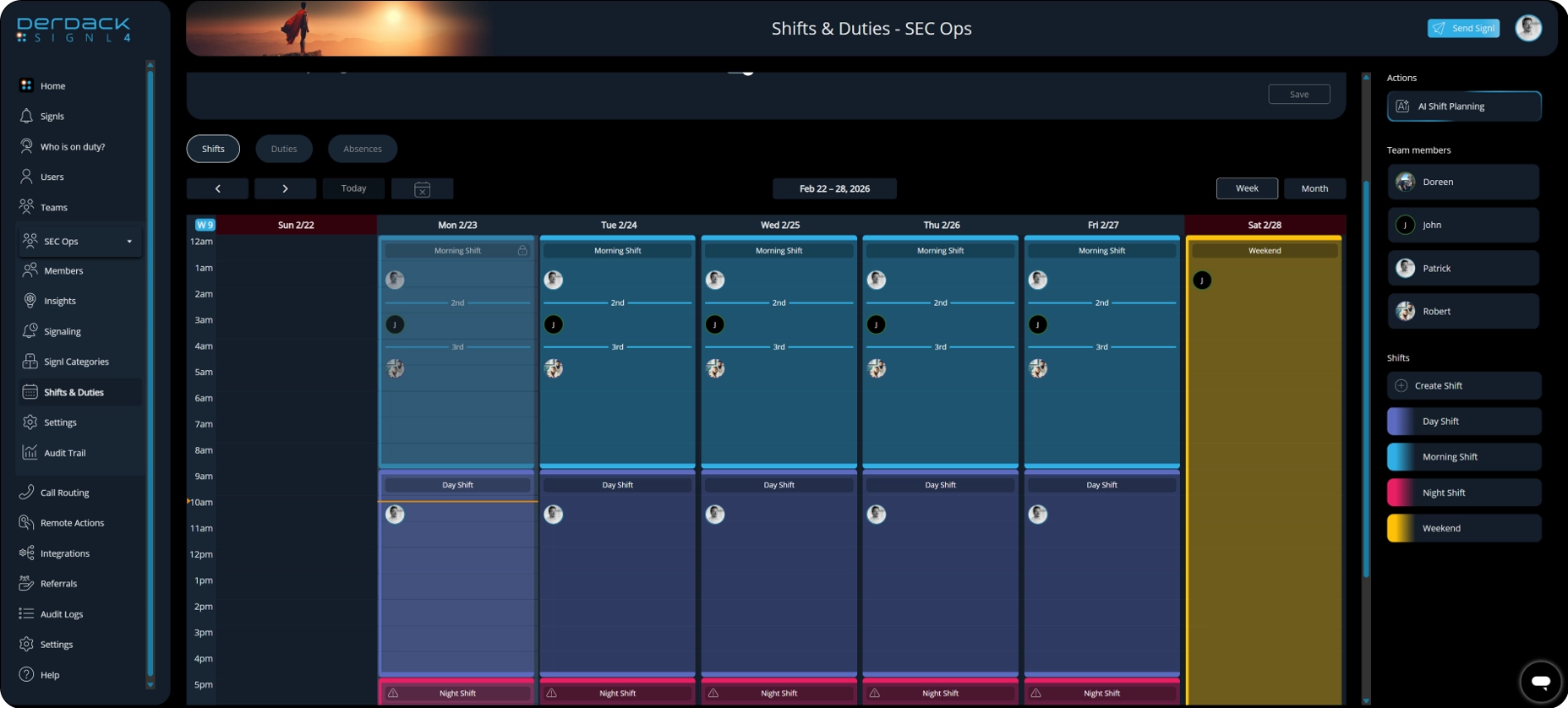
The first step is ensuring your SIGNL4 schedule reflects who is responsible for handling calls.
Create shifts that match your operational coverage. For example:
- Weekday support coverage
- Night shift or after-hours rotation
- Weekend on-call duty
Assign team members to these shifts so SIGNL4 always knows who is currently responsible.
Because call routing references the active schedule, incoming calls will automatically follow the same on-call structure your team already uses for alerts.
Step 2: Define Escalation Priority and Shift Tiers
Many teams use multiple layers of support.
SIGNL4 allows routing based on escalation priority or shift tiers. For example:
Tier 1 might include the primary on-call engineer responsible for initial response.
Tier 2 could include senior engineers or infrastructure specialists who take over if the issue escalates.
If a call is not answered by the first responder, the escalation logic ensures the next appropriate team member is contacted.
This approach also allows cross-team escalation when necessary, ensuring the call eventually reaches someone who can take action.
Step 3: Enable Call Routing
Once scheduling and escalation rules are defined, you can configure inbound call routing for the team.
SIGNL4 provides a dedicated phone number for inbound calls. When a customer or internal user calls this number, SIGNL4 determines who is currently on duty and routes the call accordingly.
The caller reaches the appropriate responder without needing to know the individual phone numbers of your engineers.
To enable call routing:
- Login to the Web Portal
- Select Call Routing on the left navigation menu
- If you are doing this for the first time, please follow the instructions on screen that will send support an email to enable this feature.
- Click on the Plus sign to provision a number.
- Configure the caller experience by customizing the messages.
For a video tutorial on setting up call routing please see our onboarding video here. https://www.youtube.com/watch?v=PxgPpY1Itz4
Step 4: Distribute Calls with Round Robin Routing
When multiple team members are on duty, routing every call to the same person is not ideal.
SIGNL4 supports round robin call distribution so that calls rotate across available responders. This keeps the workload balanced and prevents a single engineer from handling every call during a shift.
Round robin routing is especially useful when several support engineers share the same shift and are capable of responding to incoming requests.
Step 5: Filter Calls with Allow and Block Lists
Not every caller should reach your on-call team.
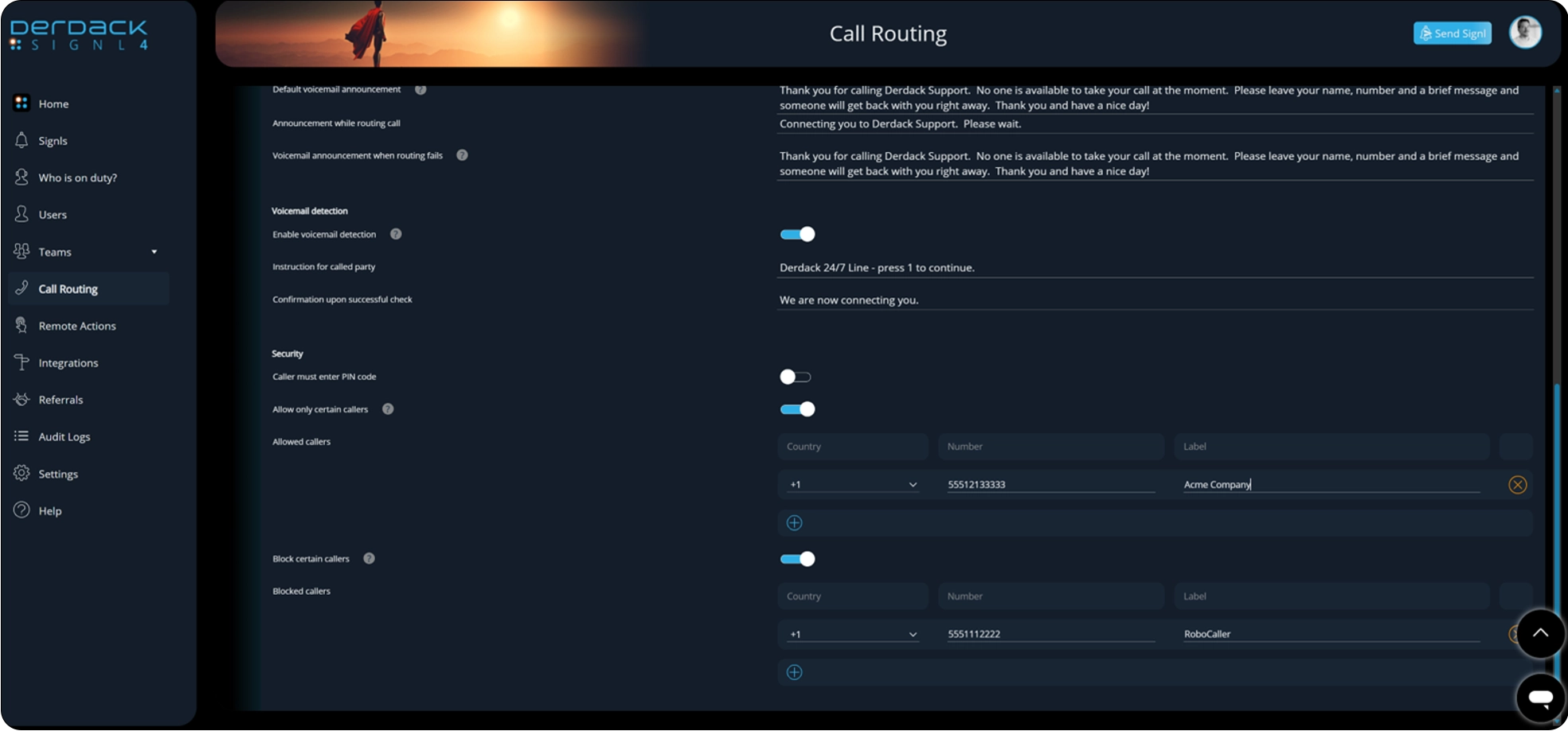
SIGNL4 allows you to define allow and block lists that control which numbers can pass through the routing system.
This is useful in several scenarios:
- Allow trusted customer numbers or internal service lines
- Block known spam numbers
- Prevent repeat nuisance calls from interrupting the on-call team
Filtering calls before they reach responders reduces unnecessary interruptions and keeps the focus on legitimate issues.
Step 6: Define Escalation Behavior for Unanswered Calls
If the first routed responder does not answer, SIGNL4 follows the configured escalation path.
The call can be routed to the next on-call member or to another escalation tier depending on how the system is configured. This ensures calls do not stop at a single device or responder.
Escalation logic helps guarantee that urgent calls eventually reach someone capable of handling the issue.
INTERNAL – Please link to the escalation blog that was written for Feb that goes into full detail on this.
Step 7: Capture Voicemail as an Alert
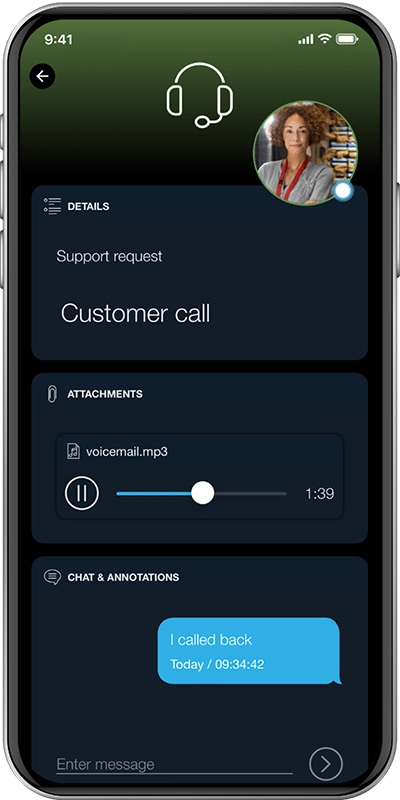
If nobody answers the call, SIGNL4 records the voicemail and converts it into an alert for the team.
The recording is attached directly to the alert and delivered to the mobile app. Team members can immediately listen to the message using the play audio function inside the alert.
This provides several advantages:
- The voicemail is visible to the entire team
- The recording is stored alongside the alert
- Responders can listen immediately from their phone
There is no need to log into a phone console or check email for voicemail notifications.
Step 8: Validate the Mobile Experience
Once configured, test the full workflow from the caller’s perspective.
Call the routing number and confirm that:
- Calls reach the correct on-duty responder
- Round robin distribution works across the shift
- Allow and block lists filter unwanted callers
- Escalation triggers when a call is not answered
- Voicemail recordings appear inside the SIGNL4 alert
From the responder’s perspective, everything happens within the mobile alert interface.
Incoming calls, escalations, and voicemail messages all arrive where the team already manages incidents.
Conclusion
Handling after hours calls should not depend on a shared voicemail inbox or a static forwarding number.
SIGNL4 Call Routing connects inbound calls with the same scheduling and escalation structure your team already uses for alerts. Calls reach the correct on-duty responder, workload can be distributed across the shift, and unwanted callers can be filtered out.
If a call goes unanswered, the voicemail is recorded and delivered directly to the team as an alert, complete with audio playback inside the mobile app.
The result is a clearer workflow where calls, alerts, and response responsibility are all aligned with the on-call process.
