
When incidents are not addressed – or not addressed quickly enough – businesses incur significant costs. Mean Time to Resolution (MTTR) increases. In the worst cases, the financial impact extends beyond your organization to customers and partners. Automated alerting reduces response times and notifies the right people when action is needed.
Consequences of Slow Alerting Workflows During High-Severity Incidents
For example, when an incident is not addressed quickly enough, affected machines can remain out of service for extended periods. What starts as a problem with a single machine quickly impacts downstream equipment and dependent processes, causing disruptions to spread throughout the operation and driving significant additional costs.
In IT environments, incidents can generate significant costs when they interrupt critical business processes or even create security vulnerabilities. Infrastructure failures and service outages can become expensive for both internal stakeholders and customers. In IT environments, incidents can generate significant costs when they interrupt critical business processes or even create security vulnerabilities. Infrastructure failures and service outages can become expensive for both internal stakeholders and customers. SLAs and security requirements are missed, penalties follow, and customers take their business elsewhere.
So why are critical events overlooked or not resolved fast enough, even when professional monitoring software is already in place?

Incident Response Without Automated Alerting
Detecting an incident is only half the battle. Responding quickly enough is the real challenge.
These situations probably sound familiar.
1. Slow Alert Identification and Prioritization +15 min.
A monitoring system detects an anomaly in a dashboard or console and generates a notification. In the best-case scenario, the operator sees the alert immediately.
More often, however, the operator is away from their desk and notices the alert much later because numerous other alerts and notifications have accumulated in the meantime and must first be prioritized according to severity.
2. Unclear Accountability +20 min.
The next step is identifying and contacting the right person. The issue is posted in a chat channel or ticketing system, where it often goes unnoticed, ownership is unclear, and no one takes immediate responsibility.
3. Notifying the Wrong Person +30 min.
The issue finally reaches the responsible team member, who realizes they cannot resolve it and must escalate the incident. Unfortunately, the colleague with the necessary expertise is unexpectedly unavailable. No one knows who should take over, and more valuable time is lost.
4. Lack of information +20 min.
A team member capable of resolving the issue starts their shift. They see that an incident has been assigned to them, but they lack critical information about what has already been attempted and where exactly the problem exists. Clarifications and follow-up discussions delay action even further.
5. Lack of Clarity Creates Duplicate Work +15 min.
Another colleague notices that the ticket has been open for a long time but has no visibility into the fact that someone is already working on it. Because communication is scattered across multiple channels, there is little visibility into who is working on the incident. So, dropping their own tasks, thinking they have to take immediate action, they contact the operator for an update, and several calls later realize that the issue is already being addressed.
6. Lack of Documentation and Insights
Eventually, the incident is resolved. Unfortunately, little or no documentation exists on when and where the incident occurred, who was involved, or how the problem was fixed. When the same issue happens again, the same delayed workflow repeats itself because valuable lessons from the previous incident were never captured or shared.
At first glance, these delays may seem unrelated. In reality, they all stem from the same problem: monitoring systems can detect incidents, but they are not designed to manage incident response workflows. Detecting an event is only the first step. Someone still needs to identify the alert, determine its severity, find the right responder, escalate when necessary, keep stakeholders informed, and document the outcome.

Automated Alerting and Notifications with SIGNL4
Automated Real-Time Event Prioritization and Alert Routing Based on On-Call Schedules
Once automated alerting is in place, the incident response process changes dramatically. Instead of relying on dashboards, emails, chat messages, and manual escalations, alerts are automatically prioritized, routed, escalated, tracked, and documented.
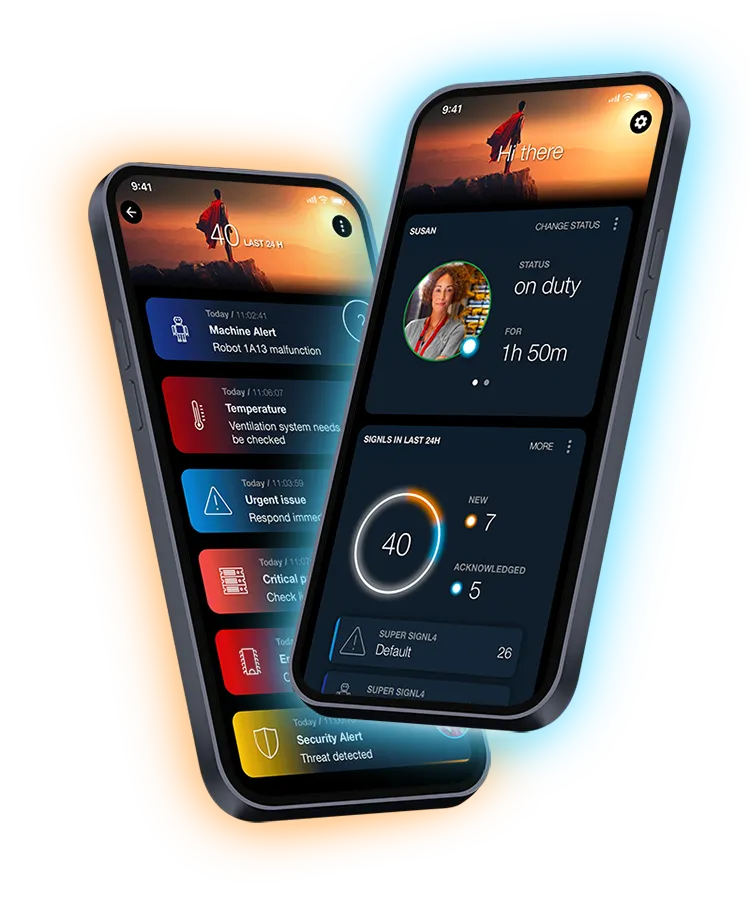
A system-generated event is automatically received by SIGNL4. In real time, the alerting software evaluates the severity of the event based on predefined alert thresholds and business rules. Using integrated call scheduling and on-call scheduling information, it immediately determines who is currently responsible, available, and qualified to respond. Automated alert delivery ensures that the right person is notified immediately through their preferred communication channel.
Ensuring Every Alert Receives a Response
The on-call engineer is away from their desk but receives the alert immediately on their smartphone and acknowledges it right away. If they are unable to acknowledge the alert for any reason, nothing falls through the cracks. Persistent alerting and automated escalations ensure that the incident receives a response.
Automated Alert Status Updates Keep the Entire Team Informed
The entire team can track the workflow and see that somebody is already handling the urgent alert.
Providing the Information Needed for Faster Incident Resolution
Because every business alert includes a clear summary of the problem, location details, and a helpful briefing, the incident can be resolved quickly. Once the issue has been fixed, the alert is closed and all stakeholders automatically receive notifications that normal operations have resumed.
Using Incident Data to Prevent Future Disruptions
SIGNL4 generates detailed reports containing timelines, involved personnel, actions taken, and resolution details. These insights help organizations identify weaknesses in their alert systems and incident response processes so similar incidents can be prevented in the future.
Replace Inefficient Alerting Processes with Automated Alerting by SIGNL4
Alerting without automation is slow, inconsistent, and expensive.
Automated alerting with SIGNL4 saves valuable time and significantly reduces costs.
It adds an essential communication layer that helps organizations replace slow and unreliable alerting with fully automated mobile alerting workflows in real time. Instead of relying on email, dashboards, reminders, alarm systems, or people manually escalating incidents, SIGNL4 automatically prioritizes alerts by severity, routes notifications to the right on-call teams, and escalates unresolved incidents until someone responds.
MTTR drops dramatically. Organizations reduce downtime, accelerate incident response, and avoid the substantial costs associated with operational disruptions. Reports, monitoring insights, and business intelligence help identify weaknesses in the infrastructure, reduce manual monitoring, and prevent future incidents before they impact operations.
By replacing inefficient alerting with automated mobile workflows, organizations can reduce downtime, improve operational efficiency, protect critical infrastructure, and avoid costly disruptions. Custom alerts, intelligent triggers, and advanced functionality ensure that critical information reaches the right people at exactly the right time.

Easily Add Automated Alerting to Your Existing Monitoring, Alerting, and Incident Management Systems with SIGNL4
SIGNL4 integrates with existing monitoring systems, observability platforms, IoT solutions, ITSM tools, business applications, and other software systems to add mobile alerts, automated escalation, call scheduling, real-time notifications, and incident response workflows.
By automating alerting and escalation processes, SIGNL4 helps businesses improve operational reliability, reduce alert fatigue, protect revenue from avoidable outages, and ensure that critical events are always handled by the right people at the right time. Whether alerts originate from infrastructure, cloud services, industrial equipment, or business applications, SIGNL4 ensures rapid notification, fast escalation, and immediate response.
Start Your Free Trial
Experience how automated alerting, intelligent notification systems, and real-time incident response can transform your operations. Start your free trial today and see how SIGNL4 helps your teams respond faster, reduce costs, and keep your systems running smoothly.
